What we are building next at Vynix
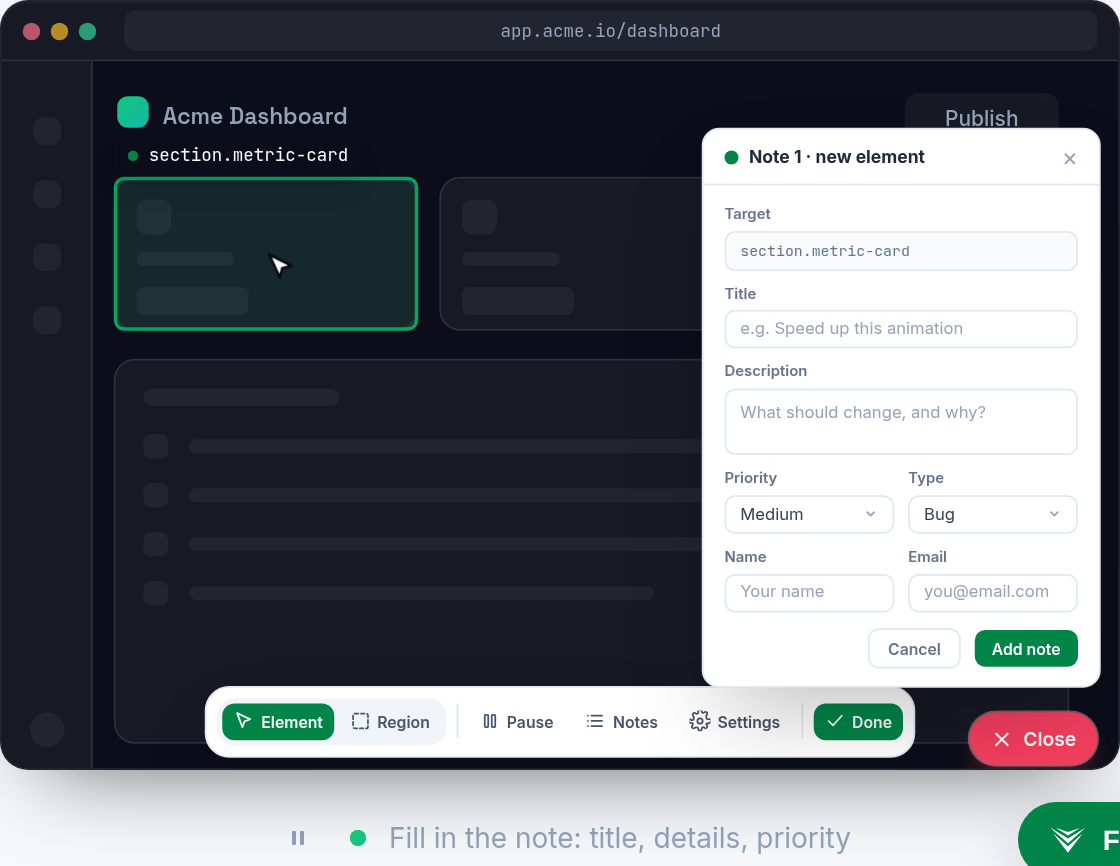
Vynix started with a simple idea: when something looks wrong on a website, the report should include the context a developer needs to act on it. Instead of asking someone to write a vague ticket, Vynix lets them click the broken part of the page and captures the element, screenshot, console and network context, and an AI diagnosis that points toward the likely root cause.

- Why the next step is about context, not just comments
- Deeper agent workflows without pretending agents are magic
- More integrations, but only where they reduce handoff friction
- Richer feedback context for the bugs that are hard to reproduce
- A cleaner bridge between non-technical reports and developer action
- How we will talk about what actually ships
Why the next step is about context, not just comments
Website feedback often fails because it loses detail at the exact moment detail matters most. A designer sees a button wrap onto two lines, a product manager notices that a filter stopped working, or a tester hits an empty state that should not exist. By the time the issue reaches a developer, the message may be only "the page is broken" or "this looked weird on my machine." That is not enough to reproduce the problem, let alone fix it.
Vynix already focuses on capturing the state around the click: the selected element, a screenshot, console output, network activity, and an AI diagnosis of the likely cause. The next direction is to keep improving the quality and usefulness of that context. The goal is not to collect noise. The goal is to help a developer or coding agent understand what happened, where it happened, and what to inspect first.
That means paying attention to the shape of a good report. A useful report connects visual evidence with technical evidence. It makes it clear which component was selected, what the user expected, what the browser saw, and whether there were errors nearby. When that context is clean, the jump from "someone noticed a problem" to "someone can start fixing it" becomes much shorter.
- Capture the page area that matters, not a full dump that hides the problem.
- Keep browser signals close to the visual issue, such as console and network context.
- Make AI diagnosis practical, with likely causes that can guide the next debugging step.
- Preserve enough detail for a developer or agent to reason about the issue later.
Deeper agent workflows without pretending agents are magic
Coding agents are most useful when they receive a narrow, well-described task. They struggle when a report is ambiguous, when the files involved are unclear, or when the expected behavior is hidden in a long comment thread. Vynix sits at an important point in that workflow because it sees the bug at the moment it is reported. That gives it a chance to turn a messy observation into a buildable instruction.
Today, Vynix can help you copy a ready-to-build prompt or open a GitHub issue and assign it to a coding agent. The direction from here is deeper agent workflows, but with a careful boundary: the tool should help agents start with better evidence, not claim that every UI bug can be solved automatically. A good agent handoff should include the visible failure, the technical context, and a prompt that asks for a focused change.
For example, if a pricing card button is visually disabled but still sends a request, the agent should not receive only "fix the pricing page." It should receive the clicked element, the screenshot, relevant console or network clues, and a concise description of the mismatch. That is the kind of input that can lead to a useful code investigation.
- Make the handoff from report to prompt more structured.
- Keep the task small enough for an agent to act on.
- Include evidence that supports the diagnosis instead of only a summary.
- Help teams review agent work with the original visual context still attached.


More integrations, but only where they reduce handoff friction
Most teams already have places where work gets planned, discussed, and merged. Vynix should fit into those paths instead of asking every team to create a new process around website feedback. The broad direction is more integrations, especially around the tools teams use to track issues, manage repositories, and hand tasks to coding agents.
The important part is restraint. An integration is useful when it removes copy-paste, preserves context, or helps the right person see the issue faster. An integration is not useful if it creates another inbox that nobody checks. That is why Vynix's integration direction is less about having a long logo wall and more about carrying the right report data into the place where engineering work already happens.
A good integration should keep the report readable. If a GitHub issue is opened, the developer should not need to search five attachments to understand what happened. If a coding agent is assigned, it should get a task that is scoped enough to begin. If a team later discusses the issue, the original click context should still be available.
- Issue destinations should keep screenshots, element context, and technical clues together.
- Repository workflows should make it easier to connect a report to code changes.
- Agent assignment should carry enough detail for investigation, not just a title.
- Team handoffs should avoid losing the original browser state.
Richer feedback context for the bugs that are hard to reproduce
Some bugs are obvious. A button is missing, a modal will not close, or a layout breaks at a common screen size. Other bugs are harder. They depend on timing, cached data, a failed request, a browser extension, an authentication state, or a particular sequence of clicks. When those bugs are reported without context, developers spend most of their time trying to recreate the scene.
Vynix's direction around richer feedback context is about improving the signal around these cases. The current capture of element, screenshot, console, network context, and AI diagnosis creates a strong base. From there, the question is how to make reports easier to trust and easier to inspect. The best report should help someone say, "I can see why this probably failed," before they open the code.
There is a balance to get right. More context is helpful only if it is organized. Raw logs can become a wall of text. Network data can be noisy. Screenshots can miss the selected element if the page changes. The work ahead is about shaping context so it answers practical debugging questions: what was clicked, what changed, what failed, and what might be responsible.
- What did the user click or select?
- What did the page look like at that moment?
- Were there console errors near the report?
- Did a related network request fail or return unexpected data?
- What likely root cause does the AI diagnosis point toward?
A cleaner bridge between non-technical reports and developer action
One of the main reasons annotation tools exist is that not everyone who spots a problem speaks in selectors, stack traces, or request payloads. That should not be required. A product manager should be able to click a broken state and explain what they expected. A customer success teammate should be able to flag the exact text or interaction that confused a customer. A QA tester should be able to report a regression without manually gathering browser logs.
At the same time, developers need reports that do not feel like riddles. Vynix is built around the bridge between those two needs. The person reporting the problem can stay close to the page and the visible issue. The developer receives technical context that would usually require extra back-and-forth. The next stage is to keep making that bridge more direct.
This is especially important for AI-assisted development. A vague human report becomes an even vaguer agent task. A precise annotated report can become a prompt with a clear target. The better the original capture, the more likely the next person or agent can move from observation to investigation without asking for the same details again.
How we will talk about what actually ships
This article is about direction, not a feature contract. We are intentionally not listing specific feature names, launch dates, or promised integrations here. Product work changes as teams use the tool, report sharp edges, and show us where the handoff from feedback to code still breaks down.
If you want to know what has actually shipped, check the changelog at vynix.in. That is the source of truth for released changes. It is where you should look for concrete updates instead of reading between the lines of a roadmap post.
The bigger direction is steady: make website issues easier to capture, easier to understand, and easier to turn into work. That means deeper agent workflows, more useful integrations, and richer feedback context. It also means keeping the product honest about what it can do. Vynix should help developers and agents start with better information, while teams stay in control of what gets built and merged.
- This post describes general product direction, not guaranteed delivery.
- The changelog at vynix.in is the place to confirm shipped updates.
- Feedback from real website debugging workflows will continue to shape priorities.
- Vynix is focused on turning website annotations into developer-ready context, not just collecting comments.
- The next product direction includes deeper agent workflows, more useful integrations, and richer feedback context without promising specific features or dates.
- The changelog at vynix.in is the source of truth for what has actually shipped.
Frequently asked questions
Is Vynix announcing specific new features or dates in this post?
No. This post describes general product directions: deeper agent workflows, more integrations, and richer feedback context. For shipped updates, check the changelog at vynix.in.
What does Vynix capture when someone reports a website issue?
Vynix captures the selected element, a screenshot, console and network context, and an AI diagnosis of the likely root cause. That context can then be used to copy a ready-to-build prompt or open a GitHub issue and assign it to a coding agent.
Why does richer context matter for coding agents?
Agents work better with focused tasks and evidence. A report that includes the clicked element, visual state, console clues, and network context gives the agent a clearer starting point than a vague ticket title.
Install the widget with one script tag, point at a bug, and hand the fix to your coding agent.
Get started free