How to Write Bug Reports AI Agents Can Fix
AI coding agents are good at working through code, but they are not mind readers. A bug report that would make sense to a teammate in a meeting often lacks the page state, browser evidence, and product intent an agent needs to make a safe fix.

- Why AI agents need better bug reports
- Start with the behavior, not the theory
- Give exact reproduction steps with a known starting point
- Attach the evidence an agent cannot see
- Write the issue so it can become an agent prompt
- Use Vynix to capture context while the bug is fresh
- A practical template you can reuse
Why AI agents need better bug reports
A human developer can ask follow-up questions, remember a recent design discussion, or notice that a screenshot came from staging instead of production. An AI coding agent usually starts with only the issue text, the repository, and any context you attach. If the report says, "checkout is broken", the agent has to guess what broke, where it happens, and which code path is involved.
Good bug reports reduce guessing. They connect the visible problem to the conditions that caused it, then point the agent toward the likely area of the codebase without pretending to know the full fix. The goal is not to write a novel. The goal is to make the first agent run useful, so it can inspect relevant files, create a patch, and explain the change without spending most of its time reconstructing the bug.
Start with the behavior, not the theory
The first lines of a bug report should describe what a user did, what they expected, and what happened instead. This sounds basic, but it is the part most reports skip. A report that starts with "probably a React state bug" may send an agent into the wrong files. A report that starts with "clicking Apply coupon leaves the button disabled after a 400 response" gives the agent a testable target.
Keep the theory separate from the observation. If you suspect a race condition, say so, but label it as a suspicion. An agent can use that clue while still checking the real evidence. This is especially important when UI bugs are caused by API responses, stale cached data, feature flags, or layout rules far from the component that looks broken.
- Bad: "Checkout page has a state issue."
- Better: "On the checkout page, entering an expired coupon and clicking Apply shows an error, but the Apply button stays disabled. Expected: the button becomes enabled so the user can try another code."
- Best: "On /checkout in Chrome, enter EXPIRED10, click Apply, wait for the 400 response from /api/coupons, then try to edit the input. The button remains disabled until refresh. Expected: after the error response, the input and button are active again."


Give exact reproduction steps with a known starting point
AI agents handle precise sequences much better than loose descriptions. If a bug depends on being logged in, having an empty cart, using a certain account type, or loading the page from a particular route, include that setup. If the bug is intermittent, say how often you saw it and what seems to make it more likely.
A good reproduction section reads like a small manual test. It should be specific enough that a developer, QA tester, or agent can try the same path and know whether the bug still exists. Do not hide uncertainty. "Reproduced twice on staging, not yet reproduced locally" is useful information. It tells the agent to be careful about environment-specific causes.
- Starting URL and environment, such as local, staging, preview, or production.
- User state, such as logged out, admin user, trial account, empty cart, or existing saved address.
- Step-by-step actions, including field values when they matter.
- Observed result, including text, visual state, status code, or missing update.
- Expected result, tied to product behavior rather than an implementation guess.
- Frequency, such as always, sometimes, or only after a hard refresh.
Attach the evidence an agent cannot see
A screenshot is useful, but it is rarely enough. Modern web bugs often sit at the boundary between the DOM, client state, API calls, and browser behavior. The visible symptom might be a blank dropdown, while the useful clue is a failed network request, a console error about an undefined property, or a CSS rule hiding the menu behind another element.
For an AI coding agent, evidence is context. It helps the agent decide whether to inspect the frontend component, the API client, the server response shape, or the styling layer. It also gives the agent something to verify against after it changes code. If the original report includes a 500 response body, a console stack trace, and the selected element, the agent can search the repository with much better terms.
- Screenshot of the broken state, preferably with the relevant UI visible.
- The selected element or component area, not just the whole page.
- Console errors and warnings that appeared during the action.
- Network request URL, method, status code, and response clues when safe to share.
- Browser, viewport, route, and environment details.
- Recent change context if known, such as "started after the pricing page redesign branch was merged".
Write the issue so it can become an agent prompt
A bug report for an AI coding agent should end with a clear task. The task should tell the agent what to fix and how to judge success. Avoid asking for a broad investigation unless that is truly what you need. "Find out why checkout is weird" is hard to complete. "Fix the disabled coupon button after a failed coupon request and add a regression test if the existing test setup supports it" is much clearer.
It is also helpful to state constraints. If the fix should not change API behavior, say that. If the product rule is that expired coupons must show a specific message, include the exact message. If the agent should avoid touching unrelated layout files, include that too. Constraints reduce the chance that a small bug report turns into a wide refactor.
- Use an imperative task: "Fix the coupon form so users can retry after an error."
- Name the success condition: "After a 400 response, the input and Apply button should be enabled again."
- Include evidence: "Console shows TypeError in CouponForm.tsx after the /api/coupons response."
- Add boundaries: "Do not change the coupon API contract."
- Ask for tests when appropriate: "Add or update a regression test for the error path if the project has coverage for this component."
Use Vynix to capture context while the bug is fresh
The hardest part of bug reporting is that the useful evidence disappears quickly. You see the broken UI, then you have to open devtools, find the right request, copy the console output, take a screenshot, write steps from memory, and file an issue. By then, you may have lost the exact state that caused the bug.
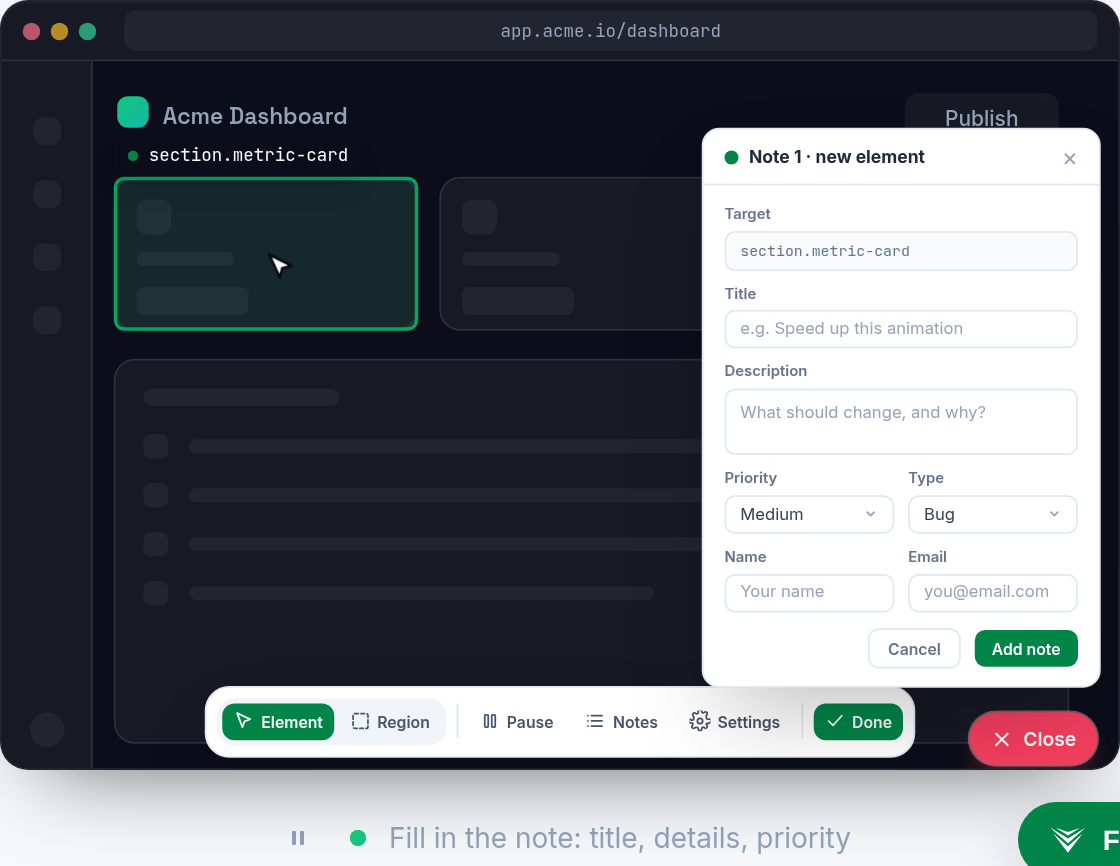
Vynix is built for that moment. You drop a lightweight widget on a site, click on what is wrong, and Vynix captures the element, a screenshot, console and network context, and an AI diagnosis of the likely root cause. From there, you can copy a ready-to-build prompt or open a GitHub issue and assign it to a coding agent.
That does not mean you should stop thinking about the report. It means the mechanical parts are handled while you focus on the product intent. You can review the captured context, add the expected behavior, remove anything sensitive, and make the final task clear. The result is an issue that carries both the human judgment and the browser evidence an agent needs.
A practical template you can reuse
You do not need a huge template for every bug. Long forms often discourage reporting, and vague forms do not help agents. A compact structure works best: summary, environment, steps, actual result, expected result, captured evidence, and task. If you use Vynix, much of the evidence can be collected from the page instead of pasted by hand.
Here is the shape to aim for in plain text. Summary: coupon retry stays disabled after expired coupon error. Environment: staging, Chrome, logged in as test buyer, /checkout. Steps: add item to cart, enter EXPIRED10, click Apply, wait for error, try to edit and apply another coupon. Actual: error message appears, but input and button remain disabled until page refresh. Expected: user can edit the coupon and retry after the error. Evidence: screenshot, selected coupon form element, console error, /api/coupons 400 response. Agent task: fix the coupon form error path so controls are re-enabled after failed coupon validation, and add a regression test if supported.
- AI coding agents fix bugs faster when reports include exact behavior, reproduction steps, and success criteria.
- Screenshots help, but console errors, network context, selected elements, and environment details often matter more.
- Vynix captures page context at the moment you see the bug, then helps turn it into a prompt or GitHub issue an agent can act on.
Frequently asked questions
Should a bug report tell the AI coding agent exactly which file to edit?
Only if you know. It is fine to say "likely related to CouponForm.tsx" or "the console stack trace points to this component", but do not force a file guess into the task. Good evidence lets the agent confirm the right files.
How much console and network data should I include?
Include the parts connected to the bug: errors, stack traces, request paths, methods, status codes, and response clues. Remove secrets, tokens, personal data, and anything unrelated. Vynix helps capture the context, but you should still review it before sharing.
Can an AI diagnosis replace a developer's judgment?
No. Treat it as a starting point. An AI diagnosis can point to a likely root cause, but the final issue should still state the observed behavior, expected behavior, and constraints so the coding agent can verify the fix.
Install the widget with one script tag, point at a bug, and hand the fix to your coding agent.
Get started free