What a feedback layer is, and why AI teams need one
AI can write code, but it still needs a clear description of the problem and the right runtime context. A feedback layer sits between the broken user experience and the developer workflow, turning vague reports into specific, buildable tasks.

- A feedback layer is the missing step between seeing a bug and fixing it
- Why normal bug reports break down with AI coding
- What a good feedback layer should capture
- How Vynix fits into this workflow
- A concrete example: the broken upgrade button
- The feedback layer changes team behavior, not just tickets
- What to look for when adding a feedback layer
A feedback layer is the missing step between seeing a bug and fixing it
Most web teams already have several places where feedback appears. A customer sends a screenshot in Slack. A product manager writes a ticket that says the button does not work. A QA tester records a video. A developer opens DevTools and tries to reproduce the issue on a different machine. None of these steps are wrong, but they often split one bug into fragments.
A feedback layer is a thin system that collects those fragments at the moment the problem is observed. Instead of asking someone to describe the page, the element, the error, the browser state, and the failed request by hand, the feedback layer captures the useful context from the live site and packages it for the person or agent that will fix it.
For AI teams, this matters because coding agents do not just need a task. They need context that is close to the source of truth. A prompt that says "fix the checkout page" is weak. A prompt that includes the clicked element, a screenshot, console output, network context, and a likely root cause gives an agent a much better starting point.
Why normal bug reports break down with AI coding
Traditional bug reports were designed for humans who can ask follow-up questions, infer missing details, and search across logs, code, and product history. AI coding agents can do some of that, but they are sensitive to missing or misleading context. If the prompt points to the wrong symptom, the agent may edit the wrong file or patch around the problem.
The breakdown usually starts with translation. A non-developer sees something wrong in the UI and translates it into plain language. A product or engineering lead translates that into a ticket. A developer translates the ticket into a hypothesis. An AI agent then receives a prompt that may be several steps removed from the actual broken element.
- A screenshot shows what looked wrong, but not which DOM element was involved.
- A ticket says an action failed, but not which network request failed or what status code came back.
- A console error is pasted without the user action that caused it.
- A prompt asks for a fix, but omits the environment, route, component, or recent runtime behavior.
- A coding agent gets a polished summary, but not the raw evidence needed to test the summary.


What a good feedback layer should capture
A useful feedback layer should not force reporters to become developers. The best time to collect context is when the issue is visible on screen. The person reporting should be able to point at the problem, add a short note if needed, and move on. The tool should do the detailed capture in the background.
For a website, the important context is usually a mix of visual, structural, and runtime data. Visual context helps the fixer understand what the reporter saw. Structural context points to the exact element. Runtime context explains what the browser was doing when the issue appeared. These pieces are much stronger together than they are alone.
- Element context: the specific button, input, link, card, modal, or section that the reporter clicked.
- Screenshot context: a visual record of the page at the time of the report.
- Console context: JavaScript errors, warnings, and other messages that may explain the failure.
- Network context: failed or suspicious requests, response behavior, and related request details.
- Diagnosis context: a reasoned guess about the likely root cause, clearly treated as a starting point rather than a guarantee.
- Handoff context: a ready-to-build prompt or issue that can move into the team's normal development queue.
How Vynix fits into this workflow
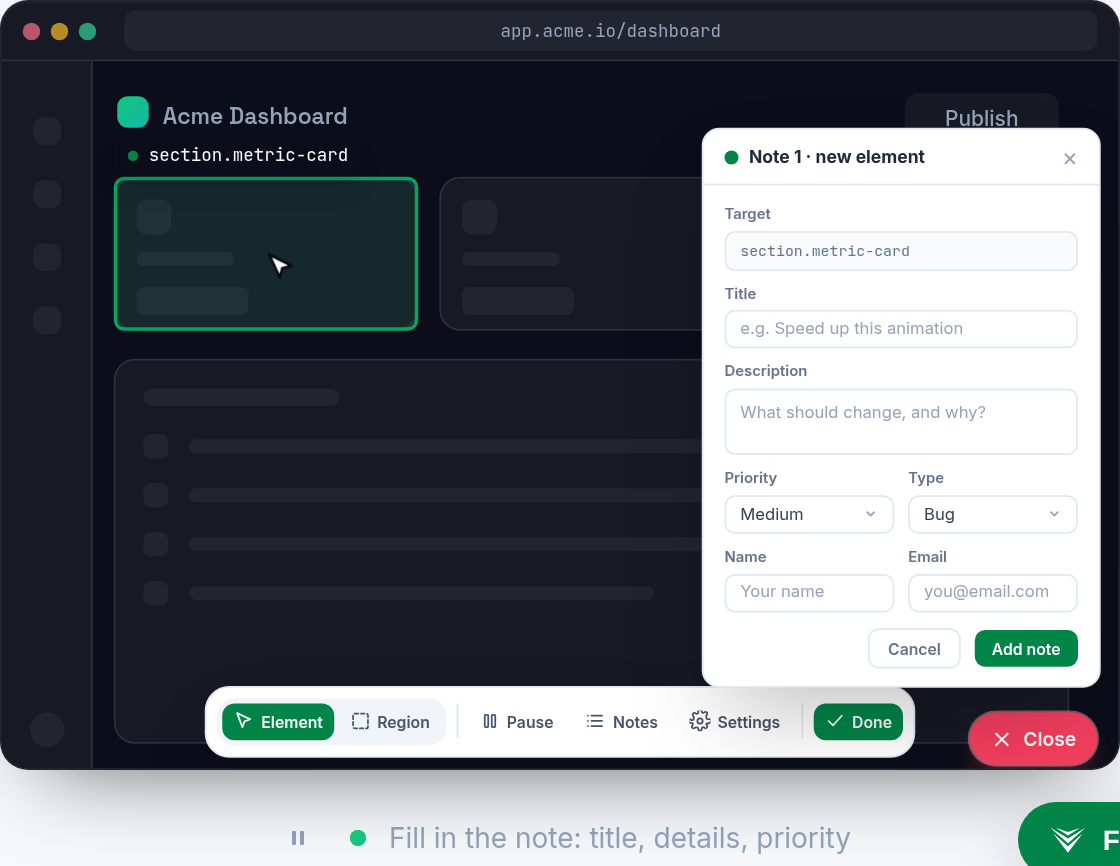
Vynix is built for this feedback layer role. You drop a lightweight widget on a site, then use it when something looks or behaves incorrectly. The reporter clicks on what is wrong, and Vynix captures the element, a screenshot, the console and network context, and an AI diagnosis of the likely root cause.
The key point is not that Vynix replaces developer judgment. It gives developers and coding agents a better starting packet. Instead of reconstructing the issue from a sentence and a cropped image, the fixer can begin with the page evidence that existed when the issue was reported.
From there, the context can be turned into action. Vynix lets you copy a ready-to-build prompt or open a GitHub issue and assign it to a coding agent. That creates a direct path from observed website problem to development work without asking the reporter to write a perfect technical ticket.
A concrete example: the broken upgrade button
Imagine a SaaS dashboard with an "Upgrade" button in the billing page. A customer success teammate clicks it during a customer call and nothing happens. The old workflow might produce a Slack message like, "Upgrade button is broken for this account," plus a screenshot. A developer later tries the same path, cannot reproduce it, and asks for browser details, account state, and errors.
With a feedback layer, the teammate clicks the broken button through the widget. The report captures the actual element that was clicked, a screenshot of the billing page, console messages, and network activity around that moment. If the button click triggered a request that returned an authorization error, that evidence can travel with the report.
Now compare the AI handoff. A weak agent prompt says, "Fix the upgrade button on billing." A stronger prompt says that the upgrade button in the billing page failed when clicked, includes the captured element and screenshot, notes the relevant console or network context, and includes an AI diagnosis of the likely root cause. The agent can then inspect the billing component, route handler, authorization check, or API call with a narrower target.
This does not mean the agent will always fix it perfectly on the first try. It means the first attempt is based on the right surface area. That is often the difference between a useful pull request and a random change that passes a shallow test while leaving the real issue unresolved.
The feedback layer changes team behavior, not just tickets
The biggest benefit is that feedback becomes easier to trust. When every report carries the same kinds of evidence, engineers spend less time deciding whether a ticket is actionable. Product and support teams also learn that they do not need to write technical essays. They can report what they see, and the layer can capture the technical details.
For teams using coding agents, this also helps keep humans in control. A human can still review the report, edit the prompt, decide whether the diagnosis makes sense, and approve the work. The feedback layer does not skip judgment. It reduces the manual collection work that usually happens before judgment can start.
It also creates a cleaner path for triage. Some reports will reveal frontend errors. Others will point to backend responses, permission issues, or missing states. When the context is captured at the source, the team can route the issue faster and avoid long threads that begin with "can you reproduce this?"
- Support can report UI issues without guessing which component is responsible.
- Product can connect visual feedback to actual developer context.
- Engineers can start from evidence instead of recreating the reporter's environment from memory.
- AI coding agents can receive prompts that include the observed symptom and the surrounding browser context.
- Managers can turn user-visible problems into GitHub issues without rewriting the whole report by hand.
What to look for when adding a feedback layer
A feedback layer should be lightweight enough that people actually use it. If reporting requires a long form, a screen recording ritual, or a separate debugging session, the team will fall back to Slack messages and vague tickets. The capture should happen where the issue appears, on the site itself.
It should also produce output that matches how the engineering team works. If your team uses GitHub issues, the report should be easy to send there. If your team asks coding agents to build from prompts, the captured context should be easy to copy into a prompt. The value comes from moving evidence into the work queue with as little translation as possible.
Finally, the team should treat AI diagnosis as a helpful hypothesis, not as a final answer. The captured console and network context are the evidence. The diagnosis can speed up the first investigation, but developers and agents should still verify the cause in code and tests. A good feedback layer improves the starting point, then leaves room for normal engineering discipline.
- A feedback layer turns visible website problems into structured developer context.
- AI coding workflows work better when prompts include evidence from the page, not just a summary of the symptom.
- Vynix helps teams capture the broken element, screenshot, console and network context, and move that context into a prompt or GitHub issue.
Frequently asked questions
Is a feedback layer the same as a bug tracker?
No. A bug tracker stores and manages work. A feedback layer captures the context of a problem at the moment it is seen, then helps turn that context into a useful issue or prompt.
Why do AI coding agents need this extra context?
Agents can act on vague prompts, but they are more likely to make useful changes when they receive the exact element, screenshot, console output, network context, and a clear description of the observed failure.
Does Vynix automatically fix website bugs?
No. Vynix captures website feedback and developer context, adds an AI diagnosis of the likely root cause, and helps you copy a ready-to-build prompt or open a GitHub issue and assign it to a coding agent.
Install the widget with one script tag, point at a bug, and hand the fix to your coding agent.
Get started free