Review rounds: turn notes into a short fix list
Website review rounds often start with good intent and end with a messy document full of screenshots, vague comments, and duplicate notes. A short fix list is better: each item points to the exact problem, carries the context a developer needs, and is ready to build.

Why review notes get hard to use
Most review notes are written far away from the thing being reviewed. Someone sees a broken menu, takes a screenshot, pastes it into a document, and writes something like "nav looks weird on mobile". By the time a developer opens the note, they have to guess the page, viewport, state, browser, account type, and the exact element that looked wrong.
That guesswork adds friction to every round. A designer may report the same spacing issue in three places. A product manager may flag copy that has already changed. A developer may spend ten minutes trying to reproduce a bug before they can even decide whether it is a CSS issue, a data issue, or expected behavior.
The goal is not to collect more notes. The goal is to collect better notes, then reduce them into a small set of fixable items. A good fix list removes duplicates, groups related problems, and preserves the evidence needed to act.
- Vague note: "This card looks off."
- Useful note: "On /pricing at 390px wide, the third plan card title wraps behind the badge."
- Best note: the same description plus the selected element, screenshot, console logs, network context, and likely root cause.
Start every note at the broken element
A review comment should begin where the problem is visible. If the issue is a button label, the note should attach to the button. If the issue is a layout shift, it should attach to the container that moves. If the issue is a blank state, it should be captured while the blank state is on screen.
This is where Vynix changes the review flow. You drop a lightweight widget on the site, open the page you want to review, and click on what is wrong. Vynix captures the element, a screenshot, console and network context, and an AI diagnosis of the likely root cause. That means the report starts with the page itself, not a separate spreadsheet or chat thread.
Element-level capture is especially useful for visual bugs that are hard to describe. A reviewer does not need to know whether a problem comes from flexbox, a missing class, or a failed API request. They can point at the issue and leave enough context for someone else to investigate.
- Click the exact element, not the general page area.
- Capture the state before refreshing, navigating, or dismissing a modal.
- Add a short human note that says what you expected to happen.
- Avoid long theories unless you have already confirmed them.


Separate observations from fixes
Review rounds become noisy when every observation is treated as a task. Some notes describe real defects. Some are questions. Some are preferences. Some are symptoms of the same underlying bug. Before creating work, sort the notes by what they actually mean.
A practical fix list usually has fewer items than the original review pile. For example, five comments about inconsistent card heights may become one task to adjust the card layout rules. Three notes about missing product images may become one task to handle failed image responses. Two comments about confusing language may stay as two copy edits because they affect different screens.
Keep the original evidence attached to the grouped fix. If you collapse ten comments into one issue but lose the screenshots and runtime context, the developer has to rebuild the investigation. Vynix helps here because each annotation can carry the captured element, screenshot, console output, network context, and AI diagnosis with it. The short list stays short without becoming thin.
- Observation: "The checkout total shows $0 after applying this coupon."
- Question: "Should the coupon field be visible for guest checkout?"
- Preference: "Can the success message be shorter?"
- Fix item: "Correct checkout total recalculation when a coupon is applied."
Use context to cut reproduction time
The slowest part of many review fixes is not the code change. It is reproducing the bug. A developer needs to know what route was open, what request failed, which component rendered, and whether the browser logged an error. If that information is missing, the fix starts with a detective story.
Context also helps decide priority. A visual gap on one marketing card is different from a failed network request that prevents checkout from loading prices. A note with console and network context gives the team a clearer signal. It may show a 404 for an image, a failed API call, or a JavaScript exception tied to the click that triggered the problem.
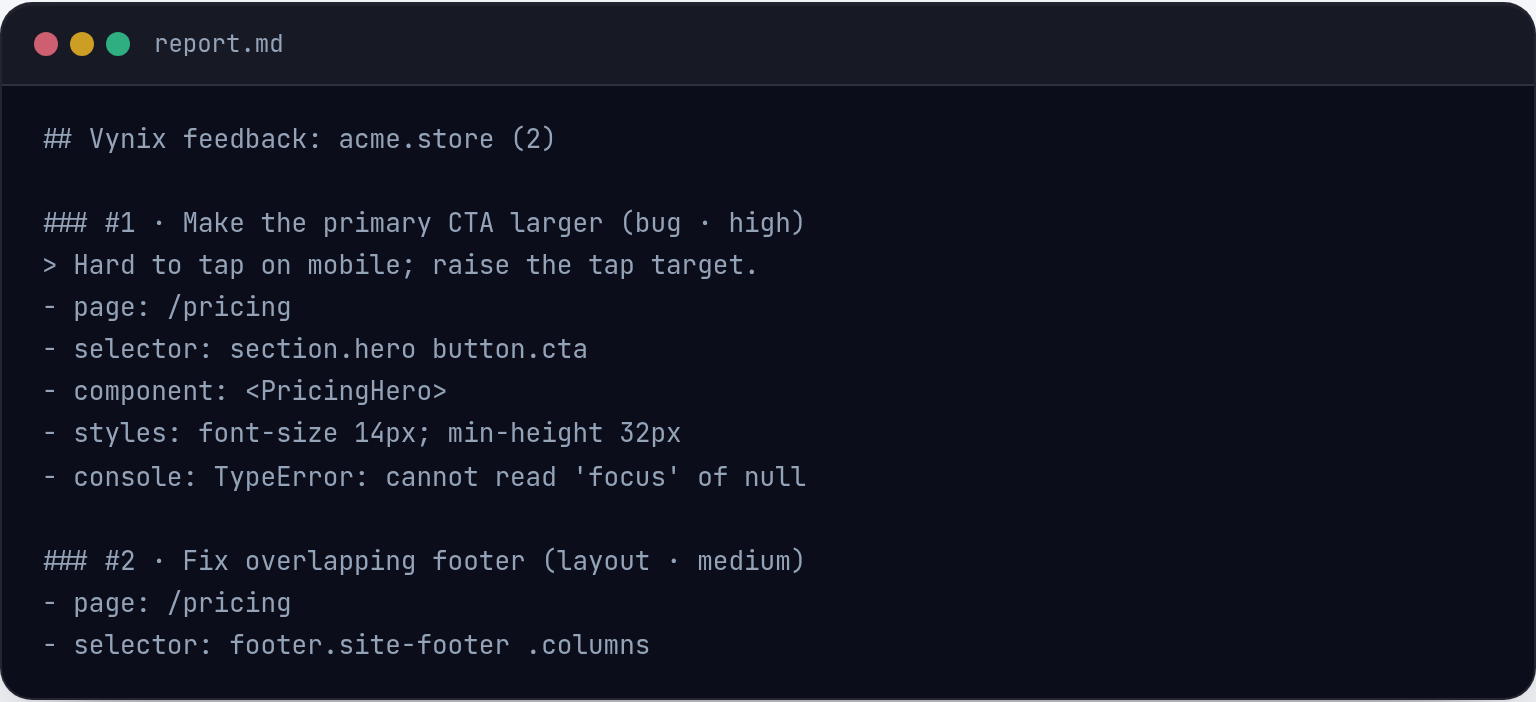
Vynix captures that surrounding information at the moment the reviewer clicks the broken element. The AI diagnosis is not a replacement for engineering judgment, but it gives the person picking up the task a starting point. Instead of opening an issue that says "broken on staging", you can include a likely cause such as a missing prop, a selector mismatch, or a failing request, when the captured context supports that direction.
Turn annotations into buildable tasks
Once the review notes are grouped and trimmed, each remaining item should be written so someone can build it without a follow-up meeting. A good task names the page, the visible problem, the expected result, and the evidence. If a coding agent will work on it, the task also needs enough instruction to avoid broad, risky changes.
Vynix supports that handoff by letting you copy a ready-to-build prompt or open a GitHub issue and assign it to a coding agent. The important part is discipline: do not send a raw pile of comments to an agent and hope it infers the plan. Give it one fix at a time, with the relevant annotations and a clear acceptance check.
For example, a weak task is "fix mobile pricing page". A better task is "On the pricing page at a narrow mobile width, the enterprise plan badge overlaps the heading. Adjust the plan card layout so the badge stays above the heading with at least the existing spacing used on the other cards. Use the attached Vynix annotation for the selected element, screenshot, and console and network context. Do not change plan copy or pricing."
- Write one task per root cause when possible.
- Include what should not change, especially on shared components.
- Attach the original annotation so the implementer can see the exact state.
- Use the copied prompt or GitHub issue as the source of truth for the fix.
Run the next round against the fix list
A review round is not finished when the first list is created. It is finished when the team can verify the fixes and avoid re-litigating the same notes. The next pass should start from the short fix list, not from the original comment dump.
For each item, check the acceptance condition first. If the pricing badge no longer overlaps the heading, close that item. If the fix caused another layout issue in the same component, create a new annotation at the new problem. Do not bury it as a reply under the old issue unless it is truly the same root cause.
This keeps review history readable. Closed items show what was resolved. Open items show what still needs work. New annotations carry fresh context instead of depending on stale screenshots from the first pass. Over time, the team builds a habit: capture at the source, group by cause, write buildable tasks, and verify against the list.
- Re-test the exact page and state from the original annotation.
- Close tasks only when the expected result is visible.
- Create a new annotation for new behavior introduced by the fix.
- Keep the final list short enough that anyone can scan it in a few minutes.
- Start review notes on the exact broken element so the context is captured while the problem is visible.
- Group scattered comments into a short fix list based on root cause, not on who reported the note.
- Use Vynix annotations, ready-to-build prompts, and GitHub issues to hand off clear, contextual tasks to developers or coding agents.
Frequently asked questions
How is this different from leaving comments in a design file?
Design comments are useful before implementation, but review bugs happen in the running site. Vynix captures the live element, screenshot, console and network context, and a likely root cause, so the note reflects what actually happened in the browser.
Should every annotation become a GitHub issue?
No. First group duplicates, remove questions that need a product decision, and combine notes that share one root cause. Open a GitHub issue when the item is clear, fixable, and has enough context for a developer or coding agent to act.
Can an AI diagnosis replace a developer investigation?
No. Treat it as a starting point. The captured context and diagnosis can reduce guesswork, but a developer still needs to confirm the cause, choose the right fix, and check that the change does not break related behavior.
Install the widget with one script tag, point at a bug, and hand the fix to your coding agent.
Get started free