Projects, roles and sharing in Vynix
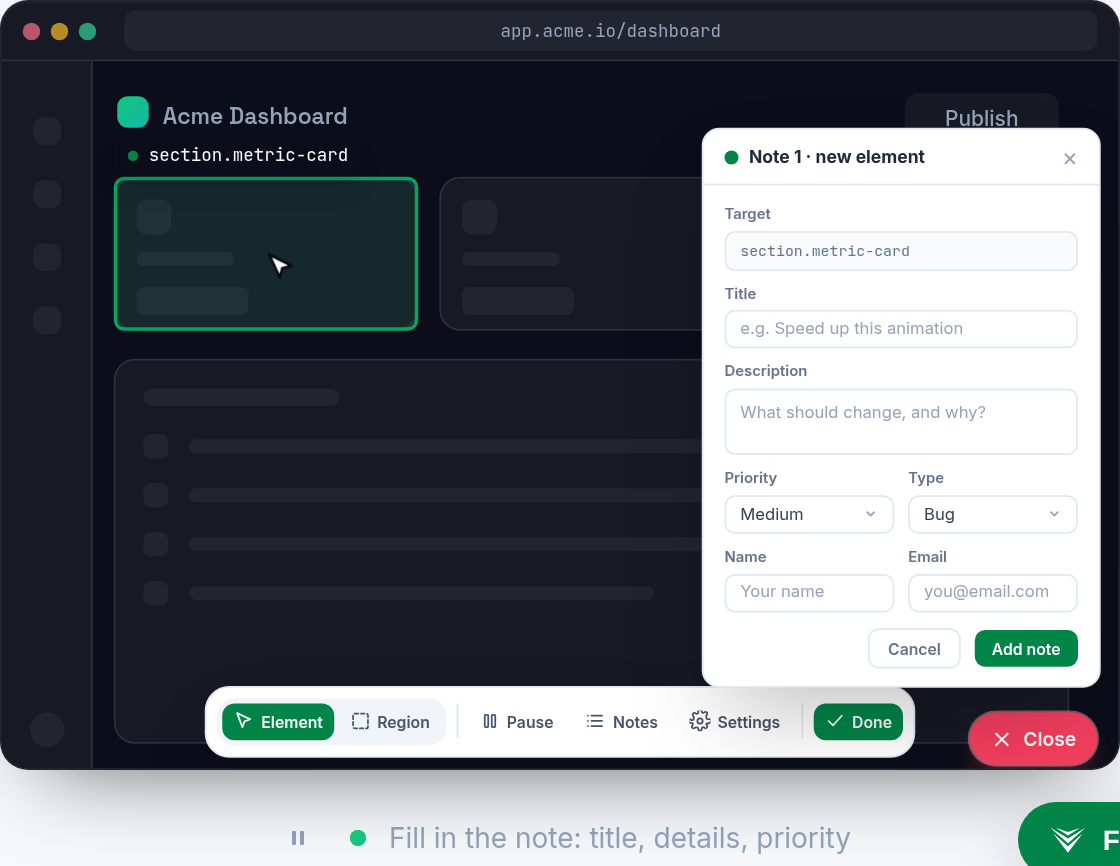
Website feedback gets messy when it lives in screenshots, chat threads, and vague tickets. Vynix helps teams turn a click on a broken page into developer-ready context, with the element, screenshot, console and network data, and an AI diagnosis captured together.

Why projects matter when feedback becomes work
A website issue is rarely just a picture of something wrong. A broken checkout button might depend on the page, the current user state, a failed API call, a JavaScript error, or a CSS rule that only applies at one viewport width. When those details are spread across a Slack message, a browser screenshot, and a developer asking follow-up questions, the team loses time before anyone starts fixing the real problem.
Projects in Vynix give that work a place to live. Instead of treating every annotation as an isolated complaint, you can group findings around the site, product area, client, or engineering stream they belong to. That makes it easier to separate a public marketing site issue from an app dashboard issue, or a production bug from feedback on a staging preview.
The practical goal is simple: when someone clicks on what is wrong, the resulting context should land where the right people can understand it. A clean project setup helps designers, QA testers, product managers, and developers look at the same captured evidence without rebuilding the story from memory.
What to put in a Vynix project
A useful Vynix project should match the way your team already ships software. If one team owns the main website and another owns the logged-in product, those should usually be separate spaces. If a client site has its own repository, release cycle, and review process, it should not be mixed into a general backlog for unrelated work.
The widget captures the concrete page context when someone reports a problem, so the project should provide the organizational context around it. Think of the project as the container for the people, site, and workflow that will handle the annotation after it is created.
- Use one project for a site or product area when the same people review and fix most issues.
- Split projects when different teams, repositories, clients, or environments need separate attention.
- Keep staging and production feedback distinct if your team handles them differently.
- Avoid creating tiny projects for every one-off page unless ownership is truly different.
- Name projects in plain language, such as "Marketing site", "Customer dashboard", or "Client A storefront".


Roles should match real responsibilities
Roles are most useful when they describe what a person is expected to do with a finding. Some people only need to point at broken UI and explain what they expected. Others need to inspect the captured console and network details, decide whether an issue is valid, and turn it into engineering work. A few people may be responsible for assigning fixes to a developer or a coding agent.
You do not need a complicated permission model to make roles useful in day-to-day work. You need shared expectations. When everyone knows who reports, who triages, and who fixes, annotations move instead of sitting as unexplained screenshots.
- Reporters click on the broken part of the page, add clear notes, and share the captured context.
- Triage owners review the annotation, confirm the issue, remove duplicates, and decide the next step.
- Developers inspect the element, screenshot, console output, network context, and AI diagnosis to find the likely cause.
- Maintainers or leads decide whether the issue should become a GitHub issue, a prompt for a coding agent, or a manual fix.
- Design and product reviewers add expected behavior, copy changes, or priority when the issue is not purely technical.
Sharing works best when the evidence travels with the comment
Most website bug reports fail because the shared comment is thinner than the actual problem. "Button does not work" is not enough. The developer needs to know which button, on which page, in which state, and what the browser saw at the time. Vynix is built around capturing that evidence at the moment the reporter clicks the page.
Good sharing means the receiver does not have to ask for the first layer of facts. The screenshot shows the visible problem. The captured element points to the part of the DOM that was selected. Console and network context show errors, failed requests, and other clues that may not be visible in the UI. The AI diagnosis gives a starting hypothesis, not a final verdict, so the developer can begin with a likely root cause instead of a blank page.
- Share the annotation instead of a cropped screenshot whenever the developer needs technical context.
- Add what you expected to happen, not only what looked wrong.
- Mention the action that caused the issue, such as "clicked Save after changing email".
- Keep the original captured context attached when moving work into GitHub.
- Do not rewrite the issue from memory if Vynix already captured the useful browser evidence.
Habits that keep projects and sharing clean
The tool can capture a lot of useful context, but the team still needs lightweight habits around it. The best Vynix workflows are not heavy process documents. They are small rules that prevent duplicate work and make annotations easy to act on.
One helpful habit is to treat every shared annotation as either a question, a confirmed bug, or ready engineering work. If the expected behavior is unclear, ask for product or design input before assigning it. If the issue is reproducible and has enough evidence, move it forward. If it is a duplicate, link it back to the existing work rather than sending another developer down the same path.
- Write the expected behavior in one sentence before handing work to engineering.
- Check for an existing annotation or GitHub issue before creating a new one.
- Keep project boundaries simple so people know where to report problems.
- Use the AI diagnosis as a starting point, then verify it against the captured console, network, and code.
- Share findings with the people who can act on them, not every channel that might be interested.
- Close the loop when a fix ships so future reviewers know the issue was handled.
- Projects should reflect real ownership, such as a site, product area, client, or engineering workflow.
- Sharing is most useful when the selected element, screenshot, console data, network context, and AI diagnosis stay attached to the report.
- A clean handoff turns a page annotation into a clear GitHub issue or ready-to-build prompt without forcing developers to reconstruct the bug.
Frequently asked questions
What does Vynix capture when someone annotates a website issue?
Vynix captures the selected element, a screenshot, console and network context, and an AI diagnosis of the likely root cause. That gives developers more than a visual report, because the technical clues travel with the annotation.
When should a Vynix annotation become a GitHub issue?
Create a GitHub issue when the finding is confirmed, actionable, and needs engineering work. If the expected behavior is unclear, triage it first so the issue does not become a vague ticket.
How should teams think about roles in Vynix?
Think in terms of responsibility: who reports issues, who triages them, who fixes them, and who assigns work to a developer or coding agent. Keeping those responsibilities clear prevents annotations from turning into another unowned feedback inbox.
Install the widget with one script tag, point at a bug, and hand the fix to your coding agent.
Get started free