Website annotation
Website annotation is the practice of attaching comments, bug reports, requests, or technical notes directly to a specific area or element on a web page. It turns visual feedback into structured context that designers, developers, QA testers, and product teams can use to understand and resolve issues faster.

What website annotation means
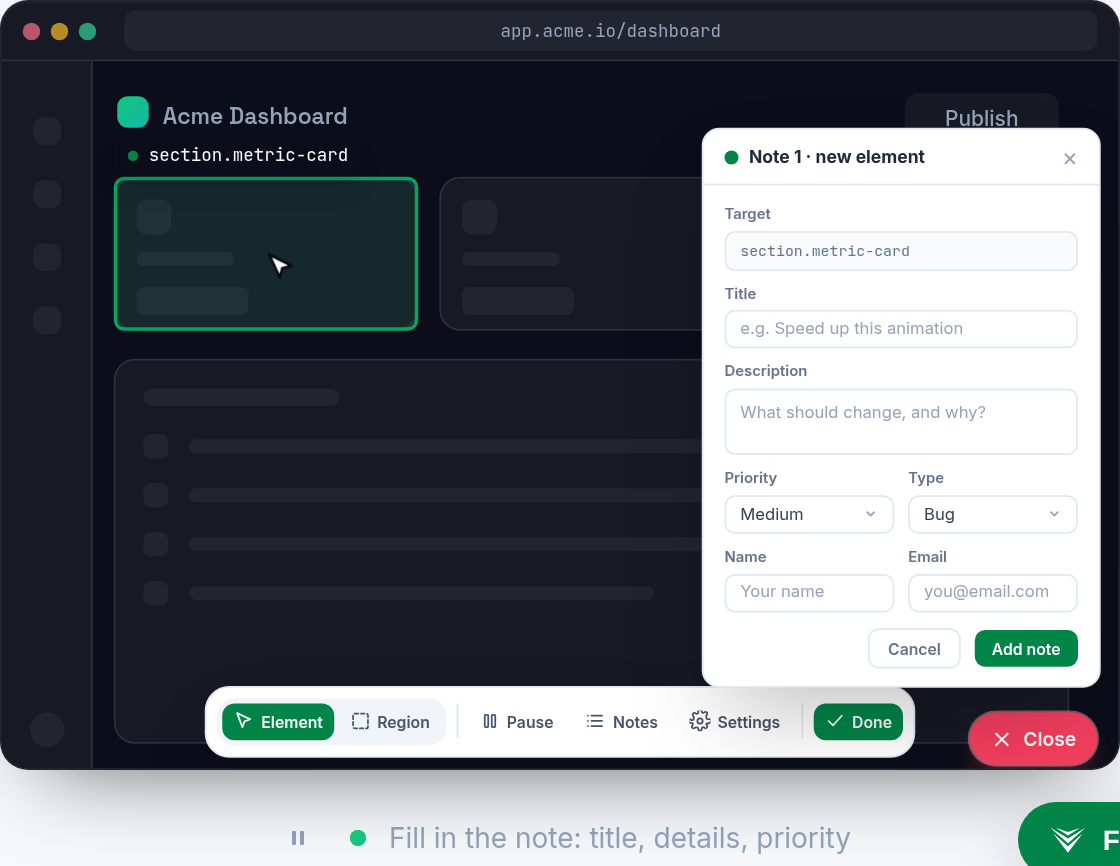
Website annotation lets someone point at a real page and say, "this part is wrong" without relying only on long written descriptions or screenshots in a separate tool. An annotation can be attached to a button, form field, layout block, image, text copy, or any visible part of a site. It usually includes a comment, the page URL, browser details, viewport size, and sometimes a screenshot or recording.
For developer teams, the useful part is not just the visual marker. A good annotation preserves context around the issue: what the user clicked, what state the page was in, which component or DOM element was involved, and what happened in the browser at that moment. That makes website annotation different from generic feedback. It is feedback anchored to a specific place in the product.
Why it matters for development teams
Most website bugs are expensive to fix when the report is ambiguous. A ticket that says "the checkout page is broken" forces a developer to ask follow-up questions, reproduce the environment, inspect the UI, and guess which part of the flow failed. An annotation can shorten that cycle by showing the exact element, page state, and user intent when the problem was found.
Website annotation is especially useful when teams ship frequently, work asynchronously, or involve non-developers in QA. Product managers, designers, support staff, and clients can report issues directly on the page without writing a technical bug report. Developers then receive visual evidence and enough surrounding detail to triage the problem. Tools such as Vynix extend this idea by capturing the selected element, a screenshot, console and network context, and an AI diagnosis, then turning that context into a ready-to-build prompt or GitHub issue.

Common examples and mistakes
Common website annotations include pointing out misaligned spacing, incorrect copy, broken links, mobile layout problems, inaccessible contrast, unexpected form validation, missing loading states, or a button that does not respond. In content-heavy sites, annotations are often used for editorial review. In web apps, they are frequently used for bug reporting, QA sign-off, and design implementation review.
A common mistake is treating annotation as a replacement for clear issue tracking. A pin on a page still needs enough detail to be actionable: expected behavior, actual behavior, severity, steps to reproduce, and acceptance criteria when relevant. Another mistake is capturing only a screenshot. Screenshots are helpful, but they often miss runtime details such as JavaScript errors, failed API calls, feature flags, logged-in state, or device-specific behavior.
How it connects feedback to bug fixing
The best website annotation workflows connect feedback directly to the development system where work gets done. An annotation should become a task, ticket, pull request note, or agent instruction without someone manually retyping every detail. This reduces handoff loss between the person who found the issue and the person or automation responsible for fixing it.
For bugs, the ideal annotation includes both human and machine-readable context. The human context explains why the issue matters. The technical context helps locate the likely source, such as a failing request, a CSS regression, a React component state issue, or an incorrect event handler. When that context flows into GitHub, Jira, Linear, or an AI coding agent, website annotation becomes more than a review layer. It becomes a bridge from observation to implementation.
Frequently asked questions
Is website annotation the same as leaving comments on a screenshot?
Not exactly. Screenshot comments are static and separate from the live page. Website annotation is tied to the actual page, element, URL, and browser context, which makes it easier to reproduce and fix issues.
Who uses website annotation?
Developers, QA testers, designers, product managers, support teams, stakeholders, and clients use it to report bugs, review UI changes, request content edits, and provide precise feedback on live or staging websites.
Vynix captures the context that turns a vague report into a clear fix.
Try Vynix free