Vynix for support teams
Vynix helps support and success teams turn user reports into bug tickets developers can act on. Instead of asking users for more screenshots, device details, or steps, your team can click the broken part of the page and capture the context behind it.

The problem
Support teams often receive vague reports like "the button does not work" or "checkout is broken" without enough detail to reproduce the issue. Developers then have to ask follow-up questions, dig through logs, or guess what the user saw. That back and forth slows resolution and makes customers feel like they are repeating themselves.
Capture the issue where it happens
Add the lightweight Vynix widget to your site, then click directly on the element that looks wrong or is not working. Vynix captures the selected element, a screenshot, and the page context needed to describe the problem clearly.
For support and success teams, this means a reported issue can become a precise visual annotation instead of a loose note in a ticket. The person triaging the report can show exactly what failed and where it happened.
Give developers the context they ask for
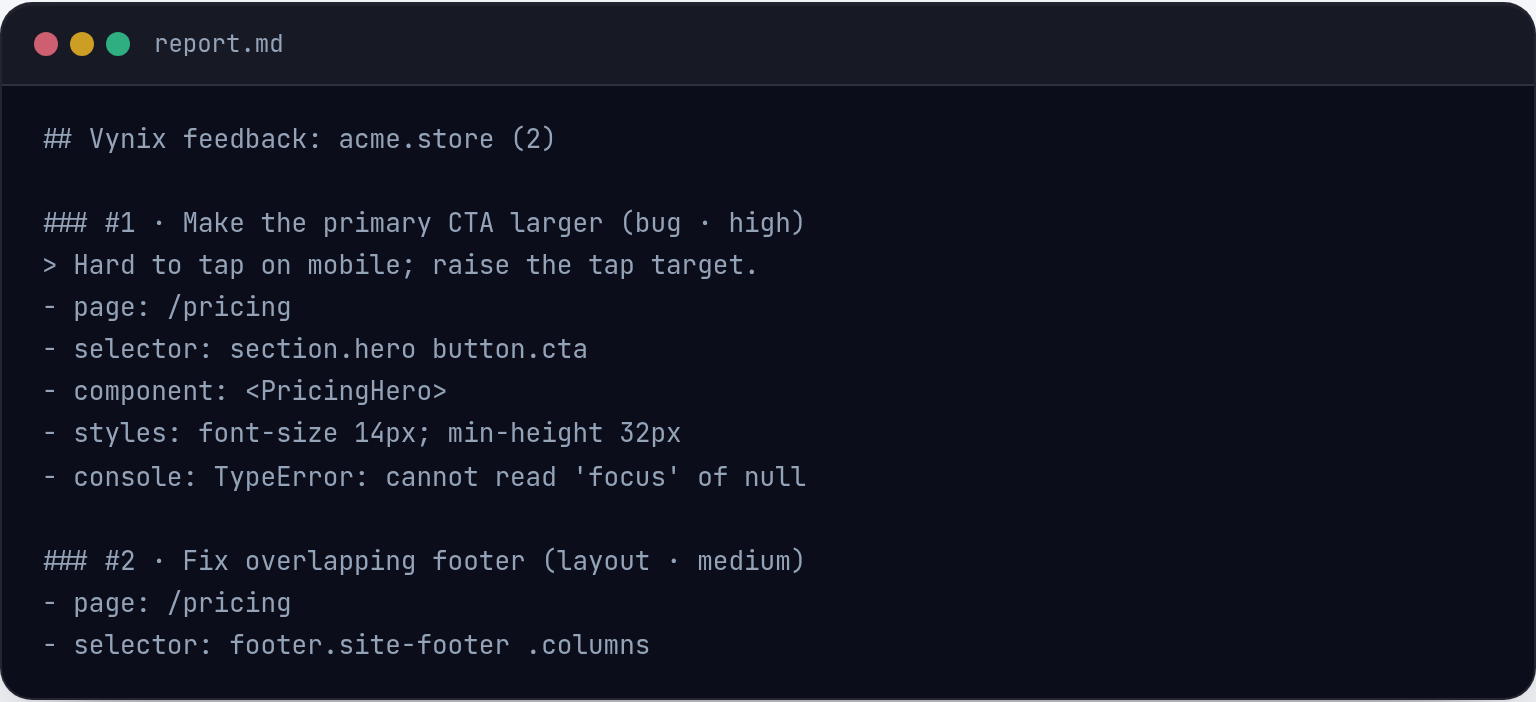
Vynix automatically includes developer context such as console and network information, along with an AI diagnosis of the likely root cause. This helps developers start from evidence instead of a short customer quote.
Your team can copy a ready-to-build prompt or open a GitHub issue from the captured report. If your workflow uses coding agents, the issue can be assigned so the handoff is direct and structured.
Keep follow-up organized
Review rounds help support, success, product, and engineering stay aligned as a fix moves forward. Teams can use projects, roles, and sharing to keep customer-reported issues grouped and visible to the right people.
This gives support teams a clearer way to track what was reported, what was handed off, and what still needs review before telling a customer the issue is resolved.
What you get
- Click-to-annotate any page so support can point to the exact broken element instead of describing it from memory.
- Automatic developer context captures screenshots, console data, and network context so engineers get more than a vague user report.
- AI root-cause diagnosis gives the team a starting point for triage without claiming to replace developer review.
- GitHub issue creation and ready-to-build prompts make the handoff from support to engineering more structured.
- Review rounds, projects, roles, and sharing help support and success teams track fixes with the right teammates involved.
Frequently asked questions
Can support teammates use Vynix without being developers?
Yes. The main workflow is to click on the part of the page that is wrong and capture the report. Vynix adds the developer context in the background.
What information does Vynix capture for a bug ticket?
Vynix captures the selected element, a screenshot, console and network context, and an AI diagnosis of the likely root cause.
Can Vynix create issues for engineering?
Yes. After capturing the report, you can copy a ready-to-build prompt or open a GitHub issue and assign it to a coding agent.

One script tag, a free plan, and your first report in a minute.
Get started free