Vynix for QA teams
Vynix helps QA and test engineers file bugs that developers can reproduce and act on. Click the broken part of a page, capture the context, and turn it into a clear handoff.

The problem
QA teams spend too much time proving what they already saw. A bug report needs the right screenshot, element, console output, network clues, steps, and environment context, but collecting that by hand slows testing down. When context is missing, reports bounce back with follow-up questions instead of fixes.
Capture the bug where it happens
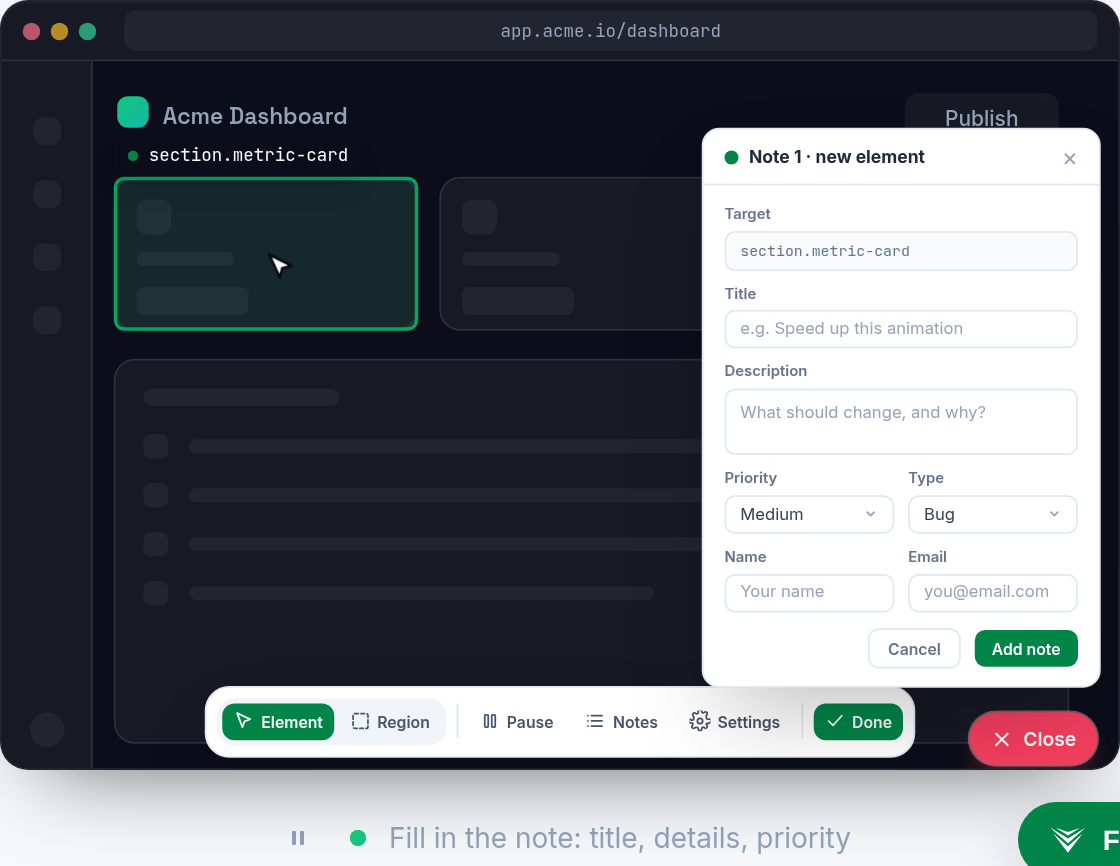
Drop the Vynix widget on any site, then click the part of the page that is wrong. Vynix captures the selected element, a screenshot, and the surrounding developer context without asking QA to inspect the page manually.
This gives each report a concrete starting point. Instead of describing a vague layout issue or broken interaction, QA can point directly at the affected UI and include the evidence developers need.
Add developer context automatically
Vynix collects console and network context alongside the annotation. It also provides an AI diagnosis of the likely root cause, so the report includes more than a screenshot and a short note.
QA engineers stay focused on testing, while developers get a cleaner view of what failed, where it failed, and what may be causing it.
Hand off without rewriting the report
When the issue is ready, copy a ready-to-build prompt or open a GitHub issue from Vynix. You can assign the work to a coding agent, keep review rounds organized, and share projects with the right roles.
That makes the path from observed failure to assigned fix shorter, with fewer status pings and fewer duplicate explanations.
What you get
- Click-to-annotate any page so QA can mark the exact broken element instead of writing long visual descriptions.
- Automatic developer context captures screenshots, element details, console logs, and network context in one report.
- AI root-cause diagnosis gives developers a likely starting point without replacing QA's judgment.
- GitHub issue creation and ready-to-build prompts make it easier to hand reproducible bugs to engineers or coding agents.
- Review rounds, projects, roles, and sharing help QA teams organize feedback across releases and test cycles.
Frequently asked questions
Does Vynix replace written bug reports?
No. It helps QA teams create better reports faster by capturing the clicked element, screenshot, console and network context, and likely root cause. You can still add your own notes, steps, and expected behavior.
Can we send issues directly to GitHub?
Yes. From Vynix, you can open a GitHub issue and include the captured context. You can also copy a ready-to-build prompt for a developer or coding agent.
Is Vynix only for production sites?
No. Vynix can be added to any site where you want the widget available, including test, staging, or internal QA environments.

One script tag, a free plan, and your first report in a minute.
Get started free