Ruttl vs Vynix
Ruttl and Vynix both help teams leave feedback on live websites, but they are built around different handoff needs. Ruttl is known for visual website feedback and design review, while Vynix focuses on turning a clicked issue into developer-ready context and next steps.

At a glance
| Capability | Vynix | Ruttl | Notes |
|---|---|---|---|
| Visual website feedback | Yes | Yes | Both tools support feedback on website pages. |
| Click-to-annotate live pages | Yes | Yes | Vynix uses a lightweight widget, while Ruttl is known for visual page review workflows. |
| Automatic element capture | Yes | Varies | Vynix captures the clicked element as part of its developer context. |
| Console and network context | Yes | Varies | Vynix is built to include technical browser context with feedback. |
| AI root-cause diagnosis | Yes | Varies | Vynix provides an AI diagnosis of the likely cause of an issue. |
| GitHub issue handoff | Yes | Varies | Vynix can open a GitHub issue from captured feedback. |
| Coding agent handoff | Yes | Varies | Vynix can prepare prompts or assignments for agent-based implementation. |
| Review rounds, roles, and sharing | Yes | Varies | Both products may support collaboration, with details depending on setup and plan. |
Different starting points for website feedback
Ruttl is a strong fit for teams that need to review web pages visually, collect comments, and collaborate around design or content changes. It is commonly used in review workflows where stakeholders need a clear way to point at what should change.
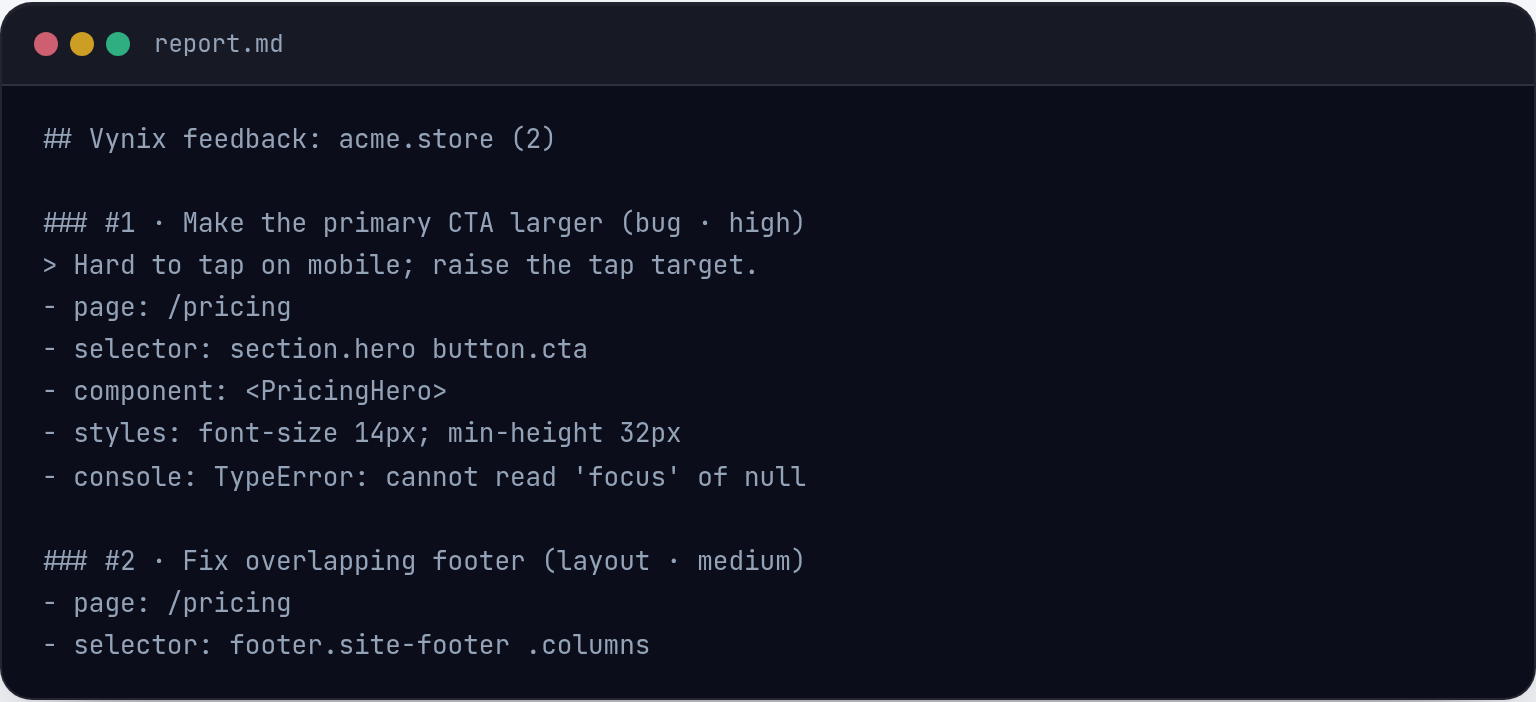
Vynix starts from a similar click-to-annotate flow, but adds developer context around the issue. When someone clicks what is wrong, Vynix captures the element, screenshot, console and network context, then prepares the issue for engineering follow-up.
Developer context and root-cause analysis
The main difference is what happens after feedback is captured. Vynix is designed to reduce the back-and-forth between reviewers and developers by attaching technical context that can help explain why a bug or UI issue may be happening.
Ruttl can be useful for communicating visual changes, but the depth of technical diagnostics can depend on the workflow, integrations, and plan. If your team regularly needs console logs, network details, or AI-assisted root-cause notes, Vynix is more directly focused on that use case.

Handoff to engineering and coding agents
Vynix is built to turn feedback into implementation work. Teams can copy a ready-to-build prompt or open a GitHub issue and assign it to a coding agent, which makes it useful when feedback needs to move quickly into code changes.
Ruttl is often a better fit when the central need is review and approval of visual work. For teams that already have a separate engineering triage process, a visual feedback tool may be enough.
Collaboration and review workflows
Both tools can support collaboration around website feedback, but they emphasize different parts of the workflow. Ruttl is oriented toward visual review, while Vynix combines annotation, technical capture, review rounds, projects, roles, and sharing.
The best choice depends on whether your feedback loop is mostly about design review or about getting bug reports and UI issues ready for developers and automation.
When Ruttl fits
Ruttl fits when your team mainly needs visual website feedback, design review, and stakeholder collaboration around page changes.
When Vynix fits
Vynix fits when your team wants click-based website feedback with automatic developer context, AI root-cause diagnosis, and direct handoff to GitHub or a coding agent.
Frequently asked questions
Is Ruttl or Vynix better for design review?
Ruttl is the more established fit for visual website feedback and design review. Vynix can support review workflows too, but its main strength is adding developer context and engineering handoff.
Which tool is better for bug reports that developers need to fix?
Vynix is built for that workflow. It captures the clicked element, screenshot, console and network context, and an AI root-cause diagnosis so developers or coding agents have more context from the start.
Can Vynix replace a visual feedback tool like Ruttl?
It depends on the workflow. If your team mostly needs design comments and stakeholder approvals, Ruttl may be a better fit. If you need feedback to become developer-ready issues, Vynix may cover more of the process.
Install Vynix on your site in a minute and capture your first report with full developer context.
Try Vynix freeThis comparison is maintained by the Vynix team and updated regularly. If something about Ruttl is inaccurate, email hello@vynix.in.