Replay.io vs Vynix
Replay.io and Vynix both help teams understand bugs with more context, but they start from different workflows. Replay.io is known for recordable, time-travel debugging, while Vynix focuses on click-to-annotate website feedback with captured developer context and handoff.

At a glance
| Capability | Vynix | Replay.io | Notes |
|---|---|---|---|
| Click-to-annotate website issues | Yes | Partial | Vynix is built for annotation; Replay.io is centered on recorded debugging sessions. |
| Time-travel debugging | Partial | Yes | Replay.io is known for replayable debugging; Vynix captures issue context rather than a full replay. |
| Screenshot and element capture | Yes | Varies | Vynix captures the clicked element and screenshot; Replay.io context depends on the recording workflow. |
| Console and network context | Yes | Yes | Both can help developers see runtime context, though they present it through different workflows. |
| AI root-cause diagnosis | Yes | Varies | Vynix includes AI diagnosis; Replay.io AI capabilities may vary by current product features and plan. |
| Ready-to-build prompt for implementation | Yes | Varies | Vynix focuses on creating handoff-ready prompts; similar workflows in Replay.io depend on setup. |
| GitHub issue and coding agent handoff | Yes | Varies | Vynix supports issue handoff and agent assignment; competitor integrations can depend on plan and configuration. |
| Review rounds, projects, roles, and sharing | Yes | Varies | Vynix includes structured review and team features; Replay.io collaboration options may vary. |
Different starting points
Replay.io is built around recording an application session so developers can inspect what happened during execution. That makes it useful when the core need is reproducing and stepping through a bug after the fact.
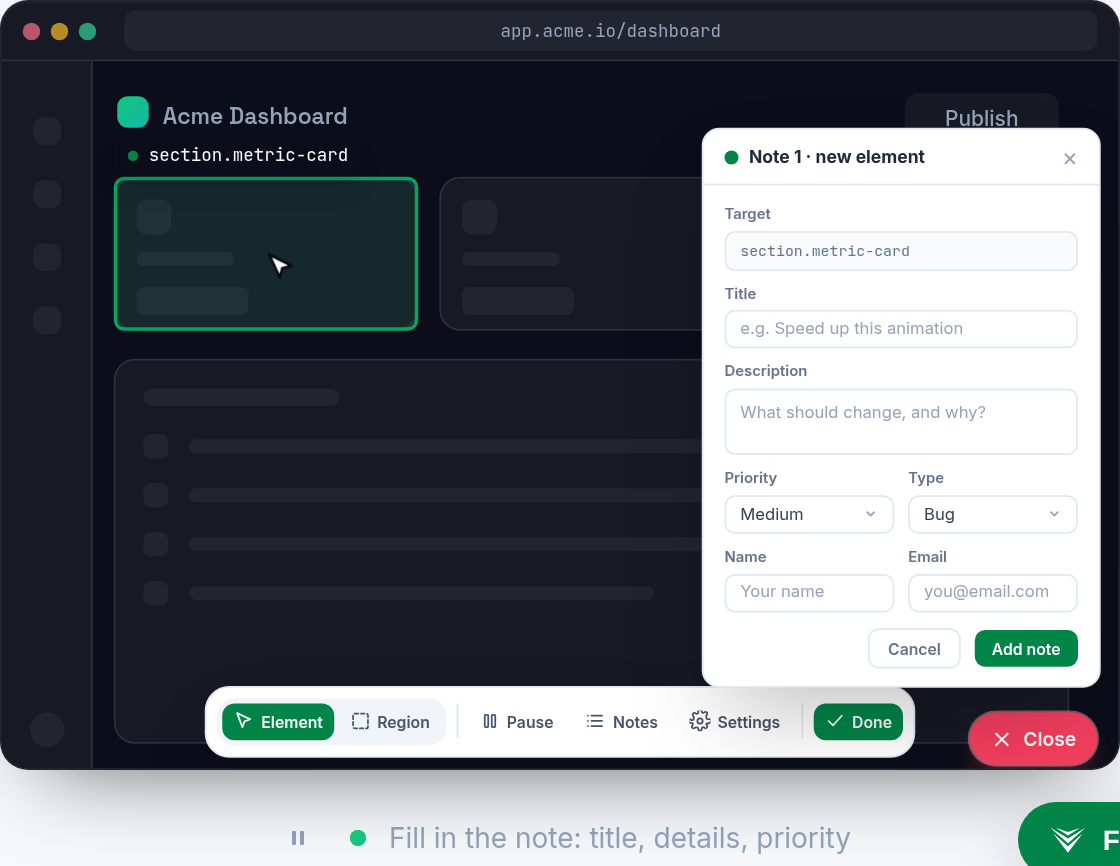
Vynix starts from the moment someone notices something wrong on a website. A reviewer clicks the problem area, and Vynix captures the selected element, screenshot, console and network context, plus an AI diagnosis.
Debugging depth and context
Replay.io is strongest when engineers need a replayable debugging artifact, especially for issues where timing, state, or execution flow matter. Its value is in letting developers investigate a recorded session rather than relying only on written steps.
Vynix is designed to package the context developers usually have to ask for later. It is less about full time-travel debugging and more about turning a visual or functional website issue into a structured, build-ready task.

Handoff to implementation
Vynix includes workflow features for moving from feedback to action, including ready-to-build prompts, GitHub issue creation, assignment to a coding agent, review rounds, projects, roles, and sharing.
Replay.io can be valuable inside an engineering debugging workflow, and its collaboration or integration options may depend on the plan and setup. Teams should compare how each tool fits their existing issue tracking and agent workflows.
Choosing between them
Choose Replay.io when the main problem is reproducing and investigating complex runtime behavior from a recorded session. Choose Vynix when the main problem is collecting website feedback, attaching developer context, and handing it off for implementation.
When Replay.io fits
Replay.io fits when developers need recordable, time-travel debugging to inspect how a bug happened during a session.
When Vynix fits
Vynix fits when teams need click-to-annotate website feedback with captured developer context, AI diagnosis, and a direct handoff to an engineer or coding agent.
Frequently asked questions
Is Vynix a replacement for Replay.io?
Not directly. Replay.io is best known for time-travel debugging with recorded sessions, while Vynix focuses on website annotation, automatic context capture, AI diagnosis, and implementation handoff.
Can Replay.io help with visual website bugs?
Yes, a recorded replay can help developers inspect what happened during a session. Vynix is more specialized for clicking on the visible issue, capturing the page context, and turning it into a task.
Which tool is easier for non-developers to use?
Vynix is likely a better fit for non-developers who need to mark issues directly on a website. Replay.io is typically more developer-oriented because its main value is debugging recorded application behavior.
Install Vynix on your site in a minute and capture your first report with full developer context.
Try Vynix freeThis comparison is maintained by the Vynix team and updated regularly. If something about Replay.io is inaccurate, email hello@vynix.in.