Mouseflow vs Vynix
Mouseflow and Vynix help teams understand what is happening on a website, but they are built for different jobs. Mouseflow is commonly used for product analytics such as heatmaps, session replay, and funnels, while Vynix focuses on turning website issues into developer-ready context.

At a glance
| Capability | Vynix | Mouseflow | Notes |
|---|---|---|---|
| Heatmaps | No | Yes | Mouseflow is known for heatmap analytics; Vynix focuses on issue annotation. |
| Session replay | No | Yes | Mouseflow is known for replaying user sessions; Vynix captures issue-specific context. |
| Funnels | No | Yes | Mouseflow supports funnel-style product analytics; Vynix is not positioned as a funnel tool. |
| Click-to-annotate page issues | Yes | Partial | Vynix is built around selecting a problem on the page; Mouseflow workflows are more analytics-led. |
| Automatic element, screenshot, console, and network context | Yes | Varies | Vynix captures developer context for an annotated issue; comparable technical capture depends on the Mouseflow setup and plan. |
| AI root-cause diagnosis | Yes | Varies | Vynix includes AI diagnosis for likely causes; AI capabilities in analytics tools can vary by product and plan. |
| GitHub issue or coding-agent handoff | Yes | Varies | Vynix is designed to create developer-ready handoff; Mouseflow handoff options depend on integrations and workflow. |
| Projects, roles, sharing, and review rounds | Yes | Varies | Both products may support team collaboration in different ways, but Vynix centers it on issue review and delivery. |
Different primary use cases
Mouseflow fits teams that want to analyze visitor behavior across pages and journeys. Its known strengths are heatmaps, session recordings, and funnel analysis for finding usability patterns and conversion friction.
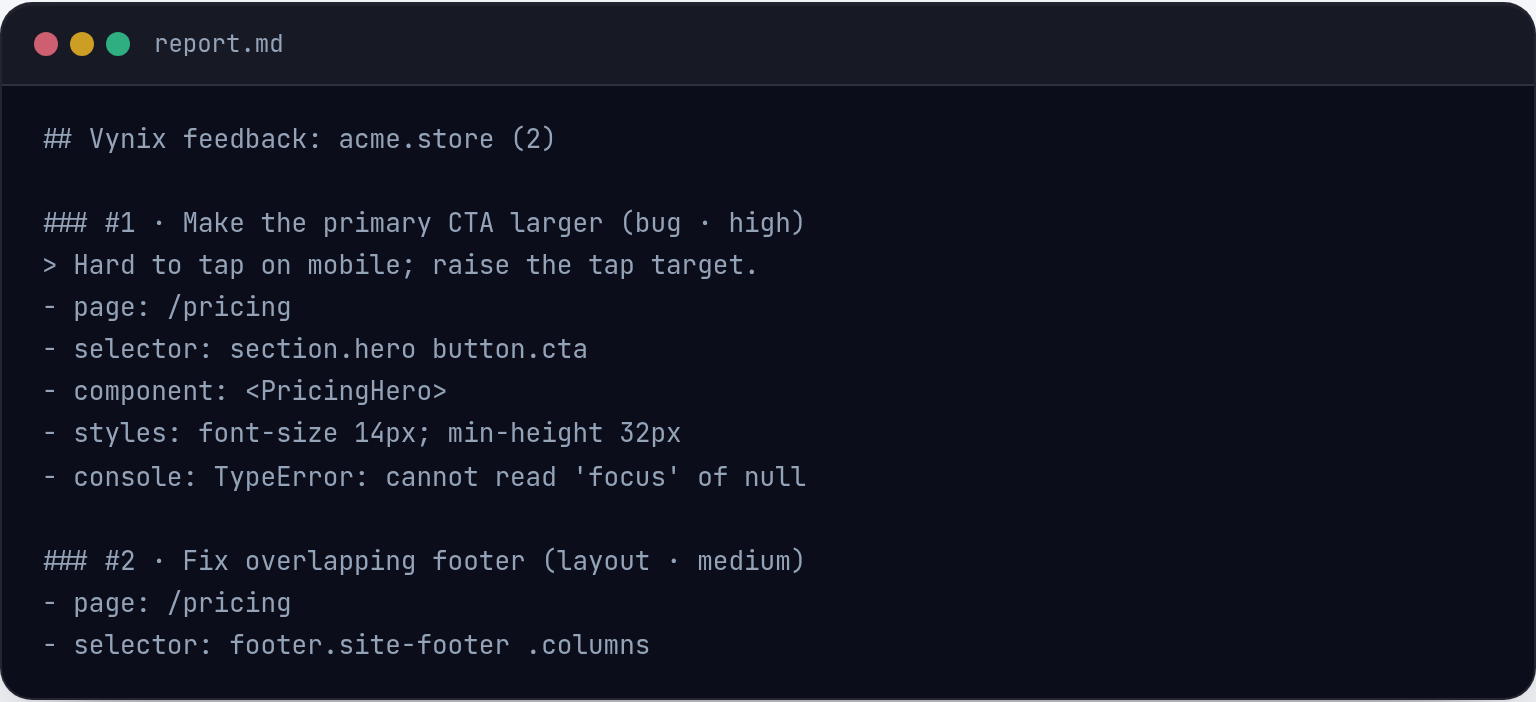
Vynix is designed for reporting and fixing specific website issues. A user clicks the problem on the page, and Vynix captures the element, screenshot, console and network context, and an AI diagnosis to help engineering act faster.
Analytics insight vs developer context
Product analytics tools are useful when you need aggregate evidence, such as where users click, where they drop off, or how sessions unfold. That helps product, UX, and marketing teams prioritize improvements.
Developer-context tools are useful when the problem is already visible and needs to be explained clearly to the person or agent fixing it. Vynix packages the page state and likely technical cause so less time is spent recreating the issue.

Workflow and handoff
Mouseflow workflows usually start with observing behavior and identifying patterns. Depending on the setup and plan, teams may then export findings or route insights into other tools.
Vynix workflows start with annotation and move directly toward implementation. Teams can copy a ready-to-build prompt or open a GitHub issue and assign it to a coding agent.
How to choose
If your main question is "what are users doing and where are they getting stuck?", Mouseflow is likely the closer fit. If your main question is "what exactly is broken and how do we hand it to engineering?", Vynix is likely the closer fit.
Some teams may use both categories together: analytics to discover patterns, and annotation with developer context to resolve specific issues.
When Mouseflow fits
Mouseflow fits when a team needs behavior analytics such as heatmaps, session replay, and funnels to understand user journeys.
When Vynix fits
Vynix fits when a team needs to capture page issues with developer context and hand them off to engineers or coding agents.
Frequently asked questions
Is Mouseflow the same type of tool as Vynix?
No. Mouseflow is generally used for product analytics, including heatmaps, session replay, and funnels. Vynix is a website annotation and developer-context tool for capturing and handing off specific issues.
Can Vynix replace Mouseflow?
Only if your need is issue capture and engineering handoff rather than product analytics. Vynix is not positioned as a heatmap, session replay, or funnel analytics platform.
Can Mouseflow and Vynix be used together?
Yes. A team could use Mouseflow to find behavior patterns or friction, then use Vynix to annotate a specific problem and send the developer context to engineering or a coding agent.
Install Vynix on your site in a minute and capture your first report with full developer context.
Try Vynix freeThis comparison is maintained by the Vynix team and updated regularly. If something about Mouseflow is inaccurate, email hello@vynix.in.