LogRocket vs Vynix
LogRocket and Vynix both help teams understand what is happening on a website, but they are built for different workflows. LogRocket is known for session replay and front-end monitoring, while Vynix focuses on click-to-annotate feedback with developer-ready context and AI-assisted handoff.

At a glance
| Capability | Vynix | LogRocket | Notes |
|---|---|---|---|
| Session replay | No | Yes | LogRocket is known for replaying user sessions; Vynix focuses on annotations. |
| Front-end monitoring | Partial | Yes | LogRocket is built for monitoring; Vynix captures context around reported issues. |
| Click-to-annotate website feedback | Yes | Partial | Vynix centers the workflow on selecting the problem area on the page. |
| Automatic console and network context | Yes | Yes | Both can provide technical context, though the capture workflow differs. |
| Element-level capture | Yes | Varies | Vynix captures the clicked element as part of the annotation. |
| AI root-cause diagnosis | Yes | Varies | Vynix includes AI diagnosis; competitor AI capabilities may depend on product and plan. |
| Ready-to-build prompt for a coding agent | Yes | Varies | Vynix is designed to turn captured context into an implementation prompt. |
| Projects, roles, sharing, and review rounds | Yes | Varies | Both can support team workflows, but the exact collaboration features differ by setup. |
Core focus
LogRocket is generally used to monitor user sessions, replay behavior, and investigate front-end issues across real user activity. It is a fit for teams that want visibility into product usage, errors, performance signals, and customer experience patterns.
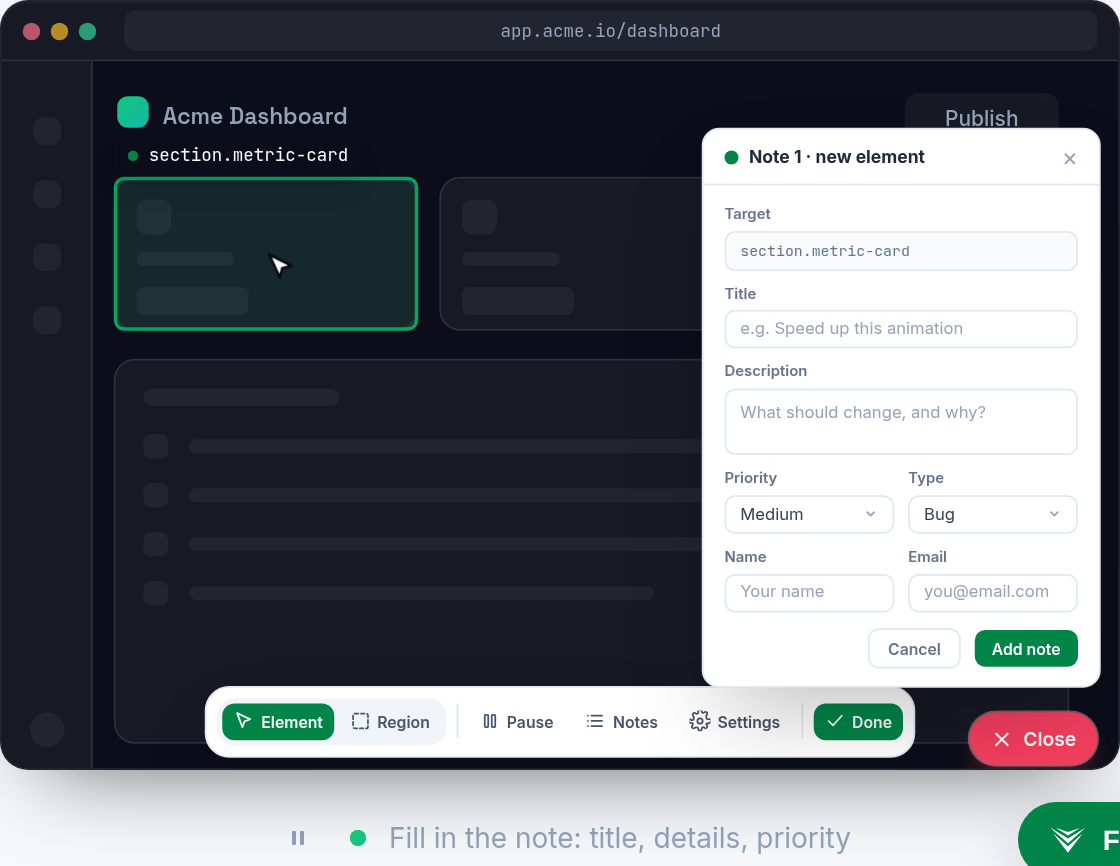
Vynix is built around a more direct feedback-to-fix workflow. A user clicks the part of a page that is wrong, and Vynix captures the element, screenshot, console and network context, plus an AI diagnosis that helps a developer or coding agent start work.
Debugging workflow
With LogRocket, teams typically start from a recorded session, error, or monitoring signal, then inspect what happened during the user journey. This can be valuable when the issue is intermittent, tied to user behavior, or discovered after the fact.
With Vynix, the workflow starts at the visible problem on the page. The annotation is meant to preserve the exact UI context and technical clues needed to explain what is wrong and turn that feedback into an actionable task.

Handoff to engineering
LogRocket can support engineering investigation by showing session context and related front-end data. Depending on the team's integrations and plan, it may also connect with issue trackers and monitoring workflows.
Vynix is designed to package the problem for implementation. Teams can copy a ready-to-build prompt or open a GitHub issue and assign it to a coding agent, making it especially useful when feedback needs to become a fix request quickly.
Collaboration and review
LogRocket is often used by product, support, and engineering teams to investigate user experience issues at scale. Its collaboration model depends on how the team organizes sessions, issues, and integrations.
Vynix includes review rounds, projects, roles, and sharing so feedback can move through a structured annotation and review process before it becomes engineering work.
When LogRocket fits
LogRocket fits when your team needs session replay, front-end monitoring, and visibility into real user behavior over time.
When Vynix fits
Vynix fits when your team wants to click on a website issue, capture developer context, and hand off an AI-assisted fix request.
Frequently asked questions
Is Vynix a replacement for LogRocket?
Not usually. LogRocket is focused on session replay and front-end monitoring, while Vynix is focused on annotated website feedback with developer context and AI-assisted handoff.
Which tool is better for debugging a specific visual issue on a page?
Vynix is better aligned with that workflow because users can click the affected element and capture a screenshot, page context, console and network details, and an AI diagnosis.
Which tool is better for understanding user behavior over time?
LogRocket is typically the better fit for that use case because session replay and monitoring are designed to show how users experience the product across sessions.
Install Vynix on your site in a minute and capture your first report with full developer context.
Try Vynix freeThis comparison is maintained by the Vynix team and updated regularly. If something about LogRocket is inaccurate, email hello@vynix.in.