Hotjar vs Vynix
Hotjar and Vynix help teams understand what is happening on a website, but they are built for different workflows. Hotjar is best known for product analytics features like heatmaps and session recordings, while Vynix focuses on turning a clicked page issue into developer-ready context.

At a glance
| Capability | Vynix | Hotjar | Notes |
|---|---|---|---|
| Heatmaps | No | Yes | Hotjar is widely known for heatmaps; Vynix is not a heatmap tool. |
| Session recordings | No | Yes | Hotjar is widely known for session recordings; Vynix focuses on issue capture. |
| Click-to-annotate page issues | Yes | Partial | Vynix is built around selecting a page element and reporting what is wrong. |
| Automatic developer context | Yes | Varies | Vynix captures element, screenshot, console, and network context; Hotjar context depends on setup and plan. |
| AI root-cause diagnosis | Yes | Varies | Vynix includes AI diagnosis for reported issues; Hotjar AI capabilities vary by product area and plan. |
| GitHub issue or coding agent handoff | Yes | Varies | Vynix is designed for developer handoff; Hotjar integrations and exports depend on workflow and plan. |
| Review rounds, projects, roles, and sharing | Yes | Partial | Both can support team workflows, but Vynix frames them around implementation review and issue resolution. |
| Product behavior analytics | Partial | Yes | Hotjar is stronger for aggregate behavior analysis; Vynix captures context around specific reported issues. |
Core difference
Hotjar is a product analytics and user behavior tool. Teams use it to see patterns across visitors, review recordings, and understand where users click, scroll, or get stuck.
Vynix is a website annotation and developer-context tool. It is designed for moments when someone sees a broken layout, confusing state, or implementation issue and wants to capture enough context for a developer or coding agent to act on it.
Where Hotjar fits best
Hotjar is useful when the main question is about user behavior at scale. Heatmaps and session recordings can help product, design, and marketing teams identify friction, validate page changes, and prioritize improvements.
It is less about creating a developer-ready bug packet from a single clicked element, though it can support feedback and investigation workflows depending on the setup and plan.
Where Vynix fits best
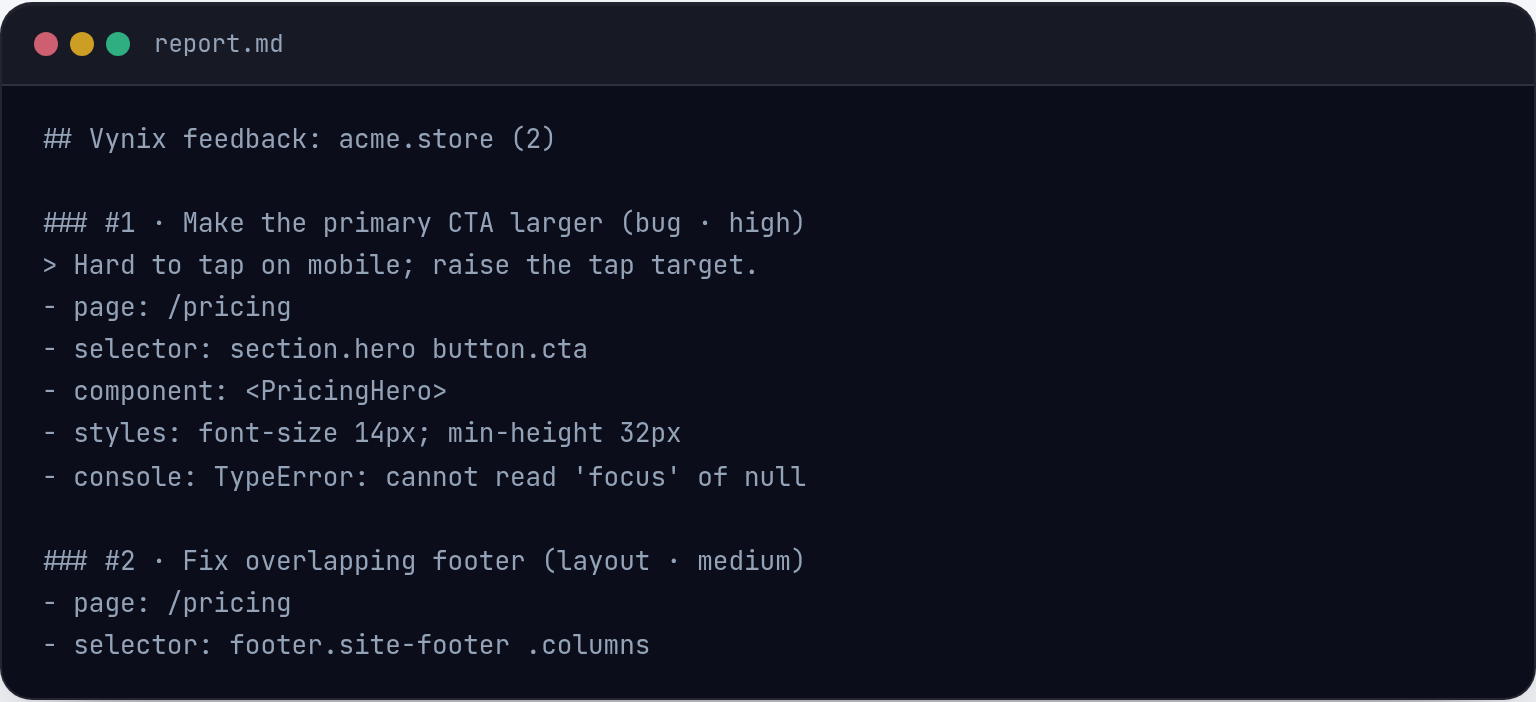
Vynix is built for reporting website issues with technical context. A user can click the part of the page that looks wrong, and Vynix captures the selected element, a screenshot, console and network context, and an AI diagnosis of the likely root cause.
From there, teams can copy a ready-to-build prompt or open a GitHub issue and assign it to a coding agent. This makes Vynix a better fit for implementation feedback, QA review rounds, and developer handoff.
How to choose
Choose based on whether you need behavioral analytics or actionable development context. Many teams could use Hotjar to find where users struggle, then use Vynix to report specific page issues with the context needed to fix them.
If your priority is aggregate insight, Hotjar is the more natural starting point. If your priority is faster issue capture and handoff, Vynix is more directly aligned.

When Hotjar fits
Hotjar fits when you need product analytics, heatmaps, session recordings, and user behavior insight across many visits.
When Vynix fits
Vynix fits when you need to click on a website issue, capture developer context, and hand it off to a developer or coding agent.
Frequently asked questions
Is Vynix a replacement for Hotjar?
Not usually. Hotjar is for product analytics and behavior insight, while Vynix is for website annotation, developer context, and issue handoff.
Can Hotjar help developers fix website issues?
Hotjar can provide useful behavioral evidence through recordings, heatmaps, and feedback, but the amount of developer-ready technical context depends on setup and plan.
Can Hotjar and Vynix be used together?
Yes. A team could use Hotjar to find where users struggle, then use Vynix to capture a specific page issue with technical context and send it into a development workflow.
Install Vynix on your site in a minute and capture your first report with full developer context.
Try Vynix freeThis comparison is maintained by the Vynix team and updated regularly. If something about Hotjar is inaccurate, email hello@vynix.in.