FullStory vs Vynix
FullStory and Vynix help teams understand what is happening on a website, but they are built for different workflows. FullStory is known for session replay and digital experience analytics, while Vynix focuses on click-to-annotate feedback with developer-ready context and AI root-cause diagnosis.

At a glance
| Capability | Vynix | FullStory | Notes |
|---|---|---|---|
| Session replay | No | Yes | FullStory is known for replaying user sessions; Vynix is not a session replay platform. |
| Digital experience analytics | Partial | Yes | FullStory focuses on analytics across user behavior, while Vynix focuses on issue-level context. |
| Click-to-annotate any page | Yes | Varies | Vynix is built around direct page annotation; similar workflows in FullStory may depend on setup and integrations. |
| Automatic screenshot and element capture | Yes | Partial | Vynix captures the clicked element and screenshot for a reported issue; FullStory provides visual session context. |
| Console and network context | Yes | Varies | Vynix includes developer context with each annotation; available technical detail in FullStory can depend on configuration. |
| AI root-cause diagnosis | Yes | Varies | Vynix generates a likely root-cause diagnosis for the selected issue; competitor AI features may vary by product tier and setup. |
| GitHub issue or coding-agent handoff | Yes | Varies | Vynix supports creating a developer handoff from the annotation; FullStory handoff workflows often depend on integrations. |
| Review rounds, projects, roles, and sharing | Yes | Varies | Both tools support collaboration in different ways, but the exact model and controls can vary by plan. |
Different starting points
FullStory typically starts with behavioral data: session replay, user journeys, frustration signals, and analytics that help teams understand how visitors experience a product.
Vynix starts with a specific issue someone sees on a page. A teammate clicks the broken or confusing element, and Vynix captures the element, screenshot, console and network context, and an AI diagnosis to help developers act faster.
Best fit by workflow
FullStory is a strong fit when product, UX, support, or analytics teams need to review user sessions, identify experience trends, and investigate behavior at scale.
Vynix is designed for teams that already know something is wrong and want to turn that observation into a clear developer handoff, GitHub issue, or coding-agent task.
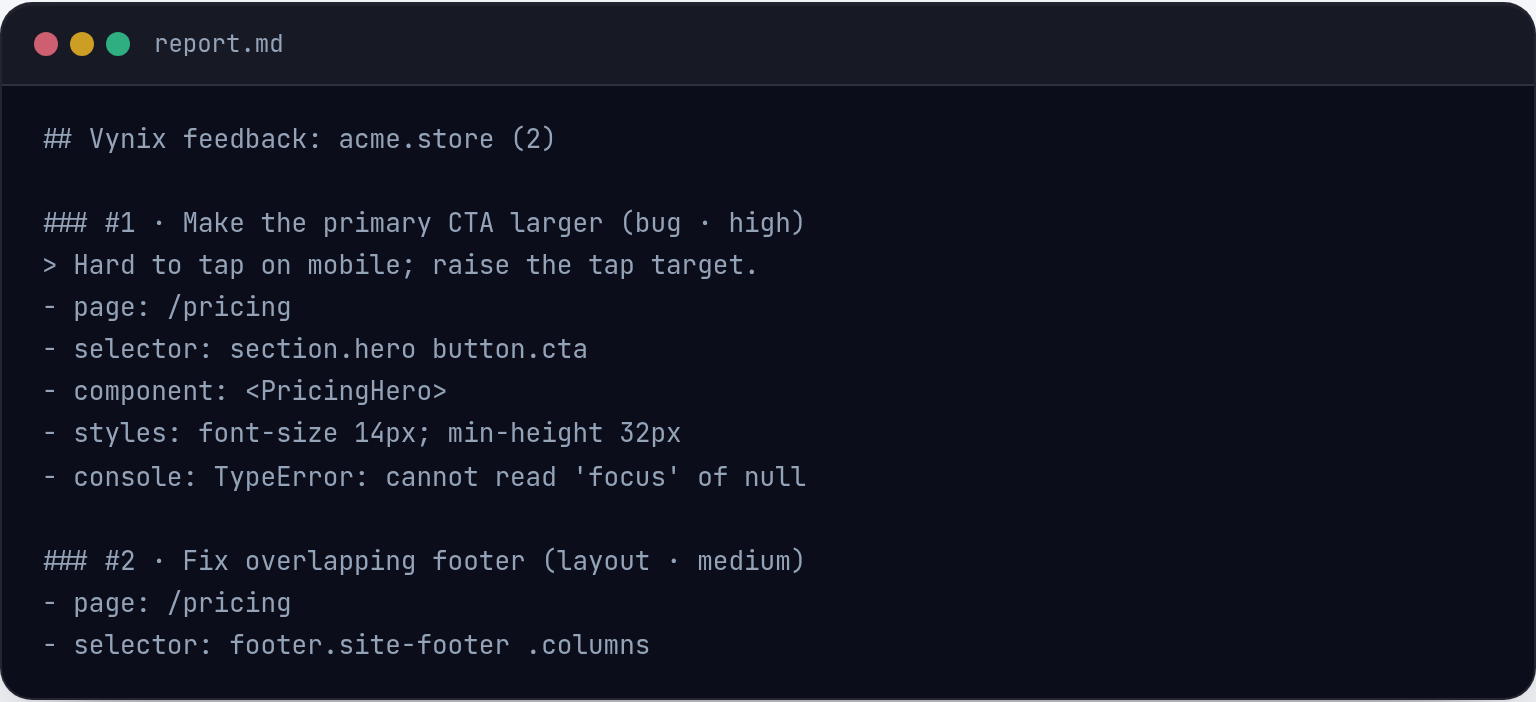
Developer context and handoff
FullStory can help teams understand what a user did before an issue occurred, and its integrations and available context can vary by plan and setup.
Vynix focuses on packaging the page-level context developers usually ask for: the clicked element, visual evidence, browser logs, network context, and a ready-to-build prompt or issue.
Using both together
These tools can be complementary. FullStory can help uncover patterns across many sessions, while Vynix can help turn a specific finding into an actionable fix request.
The better choice depends on whether the team needs broad experience analytics or a faster path from website feedback to implementation.

When FullStory fits
FullStory fits teams that need session replay and digital experience analytics to understand user behavior across many visits.
When Vynix fits
Vynix fits teams that need click-to-annotate website feedback with developer context, AI diagnosis, and a direct handoff to GitHub or a coding agent.
Frequently asked questions
Is FullStory the same type of tool as Vynix?
No. FullStory is best known for session replay and digital experience analytics, while Vynix is a website annotation and developer-context tool.
Can Vynix replace FullStory?
It depends on the job. Vynix can replace a feedback-to-developer handoff workflow, but it is not intended to replace broad session replay or product analytics.
Can teams use FullStory and Vynix together?
Yes. A team could use FullStory to discover experience issues across sessions, then use Vynix to annotate a specific page issue and hand it to a developer or coding agent.
Install Vynix on your site in a minute and capture your first report with full developer context.
Try Vynix freeThis comparison is maintained by the Vynix team and updated regularly. If something about FullStory is inaccurate, email hello@vynix.in.