Bugsnag vs Vynix
Bugsnag and Vynix both help teams understand software problems, but they start from different moments in the workflow. Bugsnag is built around stability monitoring and crash reporting, while Vynix is built around annotating a live website issue and turning it into developer-ready context.

At a glance
| Capability | Vynix | Bugsnag | Notes |
|---|---|---|---|
| Stability monitoring and crash reporting | Partial | Yes | Bugsnag is designed for ongoing error and crash monitoring; Vynix focuses on annotated issue capture. |
| Click-to-annotate website feedback | Yes | Varies | Vynix centers the workflow on clicking the broken element; Bugsnag workflows depend on setup and integrations. |
| Screenshot and page context capture | Yes | Partial | Vynix captures context from the annotation moment; Bugsnag captures diagnostic context around monitored errors. |
| Console and network context for a reported issue | Yes | Partial | Vynix packages console and network details with the annotation; Bugsnag context is tied to captured errors and configuration. |
| AI root-cause diagnosis | Yes | Varies | Vynix includes AI diagnosis for the annotated issue; AI capabilities in other tools can depend on plan and integrations. |
| GitHub issue or coding agent handoff | Yes | Varies | Vynix is built to create developer-ready handoff; Bugsnag issue tracker workflows vary by integration. |
| Review rounds, projects, roles, and sharing | Yes | Varies | Vynix includes collaboration features for website review; Bugsnag collaboration and access controls depend on plan. |
| Release health and error prioritization | Partial | Yes | Bugsnag is oriented toward release stability and prioritizing errors; Vynix is oriented toward actionable feedback items. |
Different starting points
Bugsnag is commonly used when teams need to detect, group, prioritize, and monitor application errors across releases. It is most relevant after an exception, crash, or stability issue has occurred in a monitored application.
Vynix starts when a person sees something wrong on a website. A lightweight widget lets them click the problem area, capture the page context, and package the issue for a developer or coding agent.
Where Bugsnag is strongest
Bugsnag fits teams that need ongoing visibility into application health, crash trends, affected users, release stability, and error prioritization. It is especially useful for production monitoring where issues may happen without a user manually reporting them.
Its value is in monitoring at scale, surfacing recurring problems, and helping engineering teams decide which errors to investigate first.

Where Vynix is strongest
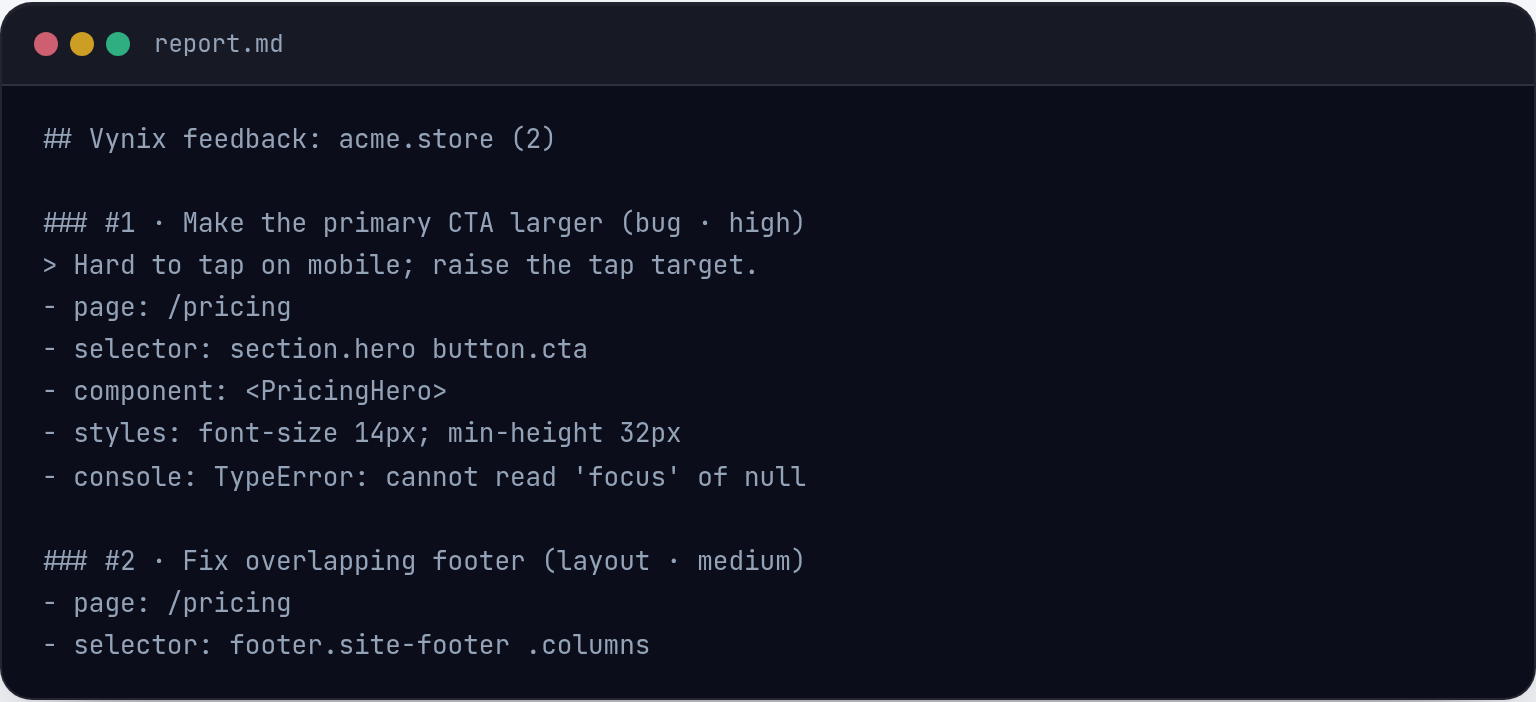
Vynix is focused on the gap between visual feedback and actionable engineering work. Instead of a vague message like 'the button is broken,' it captures the clicked element, screenshot, console context, network context, and an AI diagnosis.
That context can then be copied into a ready-to-build prompt or sent into GitHub as an issue for a developer or coding agent, reducing the back-and-forth usually needed to reproduce a website issue.
How teams can choose
The better choice depends on whether the team is solving monitoring or handoff. Bugsnag is better aligned with automated error detection and stability reporting, while Vynix is better aligned with website review, QA feedback, and agent-ready issue creation.
Some teams may use both: Bugsnag for production errors and Vynix for annotated visual feedback, review rounds, and developer-context capture.
When Bugsnag fits
Bugsnag fits when your main need is stability monitoring, crash reporting, and tracking production errors over time.
When Vynix fits
Vynix fits when your main need is to click on a website issue, capture developer context, diagnose it, and hand it off for implementation.
Frequently asked questions
Is Vynix a replacement for Bugsnag?
Not usually. Bugsnag is for error monitoring and crash reporting, while Vynix is for capturing annotated website issues with developer context and handoff details.
Can Bugsnag and Vynix be used together?
Yes. A team could use Bugsnag to monitor production errors and use Vynix when QA, product, or stakeholders need to point at a visual website issue and turn it into actionable work.
Which tool is better for sending work to a coding agent?
Vynix is more directly focused on that workflow because it captures the issue context, adds an AI diagnosis, and provides a ready-to-build prompt or GitHub issue handoff.
Install Vynix on your site in a minute and capture your first report with full developer context.
Try Vynix freeThis comparison is maintained by the Vynix team and updated regularly. If something about Bugsnag is inaccurate, email hello@vynix.in.