BugHerd vs Vynix
BugHerd and Vynix both help teams collect feedback on websites, but they approach the workflow from different angles. BugHerd is known for visual, point-and-click feedback for agencies, while Vynix focuses on turning an annotated issue into developer-ready context and a coding handoff.

At a glance
| Capability | Vynix | BugHerd | Notes |
|---|---|---|---|
| Point-and-click website feedback | Yes | Yes | Both tools support visual feedback by clicking on page elements. |
| Website annotation widget | Yes | Yes | Both are designed for feedback directly on a website. |
| Automatic screenshot capture | Yes | Yes | Screenshot-based context is a common part of visual feedback workflows. |
| Console and network context | Yes | Varies | Vynix emphasizes developer context; BugHerd capabilities may depend on configuration or plan. |
| AI root-cause diagnosis | Yes | Varies | Vynix includes AI diagnosis; comparable AI features in BugHerd may vary over time or by plan. |
| GitHub issue handoff | Yes | Varies | Vynix can open a GitHub issue; BugHerd integrations and handoff options depend on setup. |
| Coding agent handoff | Yes | Varies | Vynix is designed for assigning work to a coding agent; BugHerd is primarily known for visual feedback workflows. |
| Review rounds and sharing | Yes | Varies | Both can support team collaboration, but the exact workflow depends on the product setup. |
Overview
BugHerd is commonly used by web agencies and client-facing teams that need a simple way to collect visual feedback on live websites or staging environments.
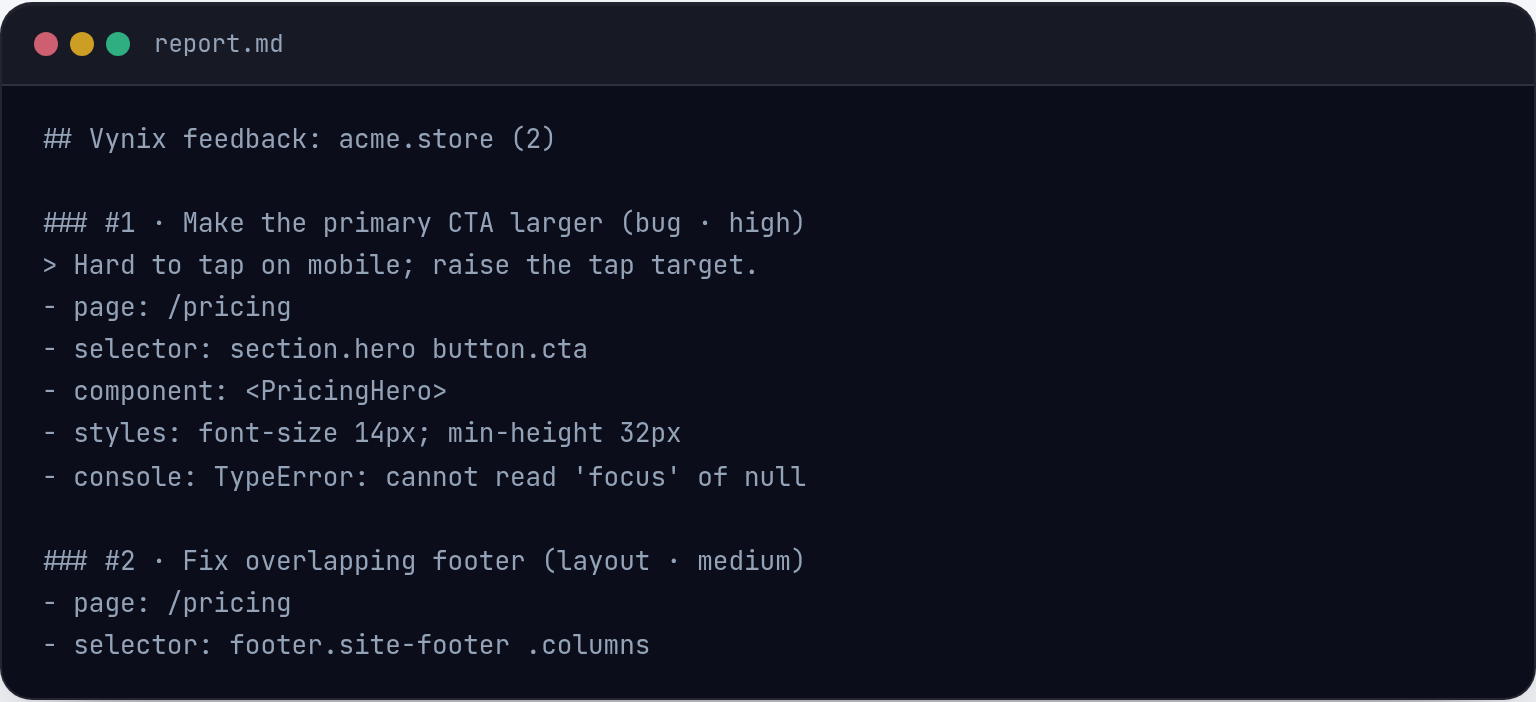
Vynix is built for teams that want each website issue to include the clicked element, screenshot, console and network context, and an AI-generated diagnosis that can be handed to a developer or coding agent.
Feedback capture
Both tools support a click-based workflow for reporting issues on a page. This makes it easier for reviewers to show what they mean instead of describing a bug from memory.
The main difference is the amount of technical context captured during that moment. Vynix is designed to automatically package developer context around the selected element, while BugHerd's depth can vary by setup and plan.

Developer handoff
BugHerd can fit well when the primary need is collecting, organizing, and managing visual website feedback from clients or internal reviewers.
Vynix is more focused on the next step after feedback: helping developers understand the likely root cause, generate a ready-to-build prompt, or open a GitHub issue that can be assigned to a coding agent.
Team workflow
For agency feedback cycles, BugHerd's visual feedback category is a familiar fit, especially when non-technical stakeholders are involved.
For engineering-oriented teams, Vynix adds projects, roles, sharing, and review rounds around a workflow that is closer to debugging and implementation.
When BugHerd fits
BugHerd fits when an agency or client-facing team mainly needs straightforward point-and-click visual feedback on websites.
When Vynix fits
Vynix fits when a team wants website annotations to include developer context, AI diagnosis, and a direct path into GitHub or a coding agent workflow.
Frequently asked questions
Is BugHerd or Vynix better for agency client feedback?
BugHerd is a strong fit when the main workflow is collecting visual website feedback from clients or reviewers. Vynix can also support review rounds, but it is more developer-context focused.
Does Vynix replace a bug tracker?
Vynix is not just a feedback form. It captures website issues with technical context and can open a GitHub issue, so it can complement or feed into an existing development workflow.
Which tool is better for debugging website issues?
Vynix is designed for debugging-oriented handoff because it captures the clicked element, screenshot, console and network context, and an AI diagnosis. BugHerd is best known for visual feedback, with technical depth depending on the setup and plan.
Install Vynix on your site in a minute and capture your first report with full developer context.
Try Vynix freeThis comparison is maintained by the Vynix team and updated regularly. If something about BugHerd is inaccurate, email hello@vynix.in.