Asana vs Vynix
Asana and Vynix help teams coordinate work, but they are built for different moments in the workflow. Asana is a broad project management platform, while Vynix focuses on turning website issues into developer-ready context.

At a glance
| Capability | Vynix | Asana | Notes |
|---|---|---|---|
| General project management | Partial | Yes | Asana is built for broad work and project tracking, while Vynix includes projects and review rounds for website issue workflows. |
| Click-to-annotate a website element | Yes | Varies | Vynix is built around clicking on page elements. Asana feedback capture depends on setup and integrations. |
| Screenshot capture for web feedback | Yes | Varies | Vynix captures page evidence as part of the report. In Asana, screenshots are typically attached manually or through connected tools. |
| Console and network context | Yes | Varies | Vynix automatically captures developer context. Asana can store technical details, but automatic browser context depends on external tooling. |
| AI root-cause diagnosis | Yes | Varies | Vynix provides an AI diagnosis for reported website issues. Asana AI capabilities and availability vary by plan and use case. |
| GitHub issue or coding-agent handoff | Yes | Varies | Vynix supports ready-to-build prompts and GitHub issue handoff. Asana integrations and automation options vary by workspace setup. |
| Roles, sharing, and collaboration | Yes | Yes | Both support team collaboration, though Asana is broader and Vynix is focused on website review and issue workflows. |
| Review rounds for website fixes | Yes | Partial | Vynix includes review rounds for website feedback. Asana can track review tasks, but the review process is more general. |
Different categories, different jobs
Asana is best understood as a project and work management tool for organizing tasks, projects, timelines, approvals, and team collaboration across departments.
Vynix is a website annotation and developer-context tool. It is designed for reporting something wrong on a live or test site, capturing technical context, and helping a developer or coding agent understand what to fix.
Feedback capture and technical context
For general task intake, Asana can collect requests through tasks, forms, comments, and integrations, depending on how a workspace is set up.
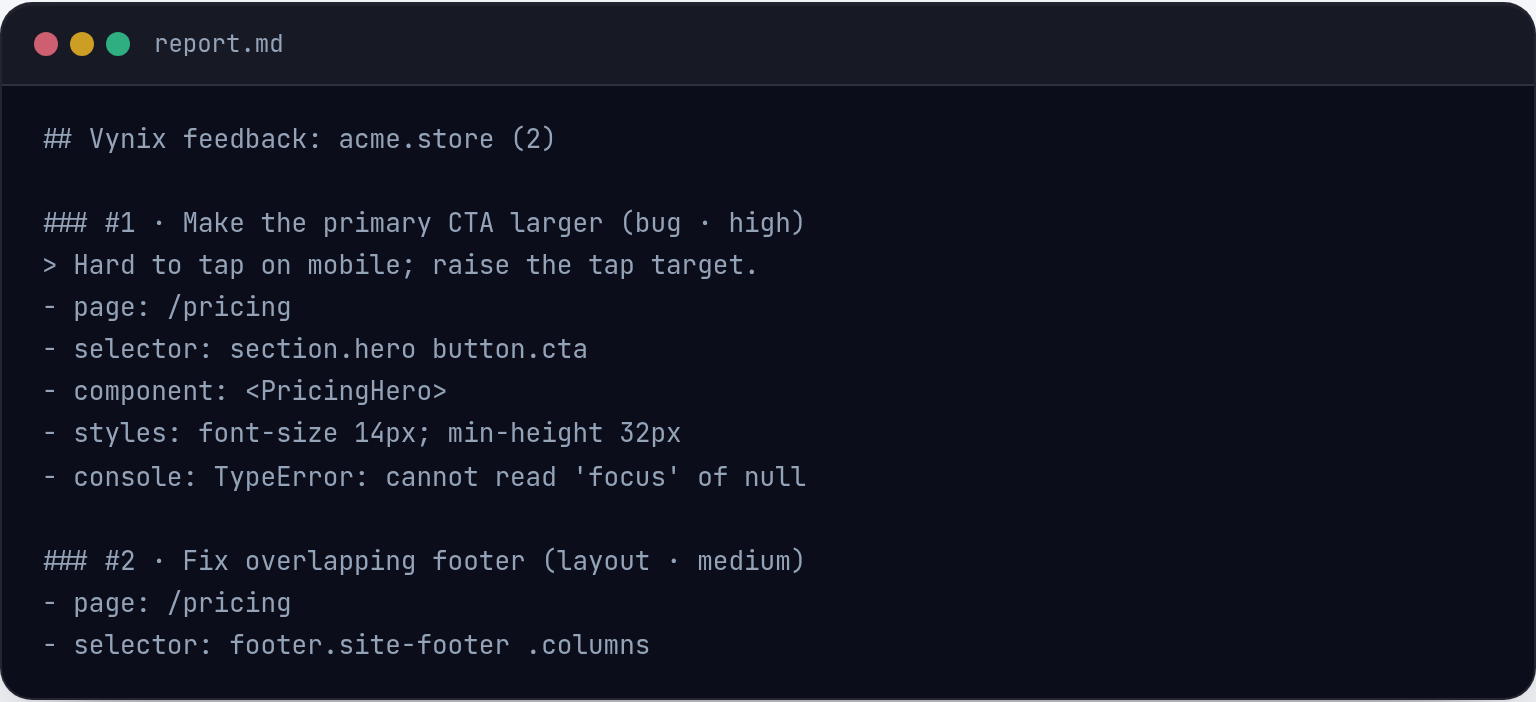
Vynix is more specialized for web QA and product feedback. A user clicks on the affected page element, and Vynix captures a screenshot, element details, console and network context, plus an AI diagnosis of the likely root cause.
Handoff to builders
Asana helps teams assign, prioritize, track, and discuss work. It can be a strong system of record for cross-functional planning and execution.
Vynix focuses on the handoff from observed website issue to implementation. Teams can copy a ready-to-build prompt or open a GitHub issue and assign it to a coding agent, which can reduce back-and-forth for engineering tasks.
How they can work together
Many teams may not need to choose only one. Asana can manage the broader roadmap, project status, and ownership, while Vynix can capture high-quality technical reports from the website itself.
The better fit depends on whether the main need is general team coordination or faster, more precise website issue reporting and developer handoff.

When Asana fits
Asana fits when a team needs broad project management for tasks, timelines, ownership, approvals, and cross-functional coordination.
When Vynix fits
Vynix fits when a team needs to capture website issues with screenshots, technical context, AI diagnosis, and a path to developer or coding-agent handoff.
Frequently asked questions
Is Asana a replacement for Vynix?
Not exactly. Asana is a broad project management platform, while Vynix is focused on capturing website issues with developer context and handing them off for implementation.
Can teams use Asana and Vynix together?
Yes. A team could use Vynix to create precise website issue reports and use Asana to manage broader priorities, planning, and team coordination.
Which tool is better for developers fixing website bugs?
Vynix is more specialized for that workflow because it captures the clicked element, screenshot, console and network context, and an AI diagnosis. Asana can still help track the work once it is defined.
Install Vynix on your site in a minute and capture your first report with full developer context.
Try Vynix freeThis comparison is maintained by the Vynix team and updated regularly. If something about Asana is inaccurate, email hello@vynix.in.